Showing posts with label IE8. Show all posts

Saturday, June 13, 2009

What are those colors on IE tabs?

colored tabs

I thought this was one of the best features in Internet Explorer 8, but not everyone gets the meaning of the colors on the tabs. The colors represent that the tabs are related, meaning that you followed a link from one page, IE opened another tab and assigned the same color as the previous tab, so that way the tabs that are derived from other tabs are now all grouped and it’s very easy to see this, very useful when you have multiple tabs open for different purposes. I just had to blog this because someone actually asked me what those colors were for, so I figured there’s more people who may have the same question.

Friday, March 27, 2009

Do you want to view only the webpage content that was delivered securely? The simple guide

The post about the new dialog for secure/unsecure items in IE8 has had quite a few visits, so I thought I would make it much easier on the visitors to get to what they specifically need, I am guessing they are arriving here mainly to find out:
1 - What the heck does it mean.
2 - What they should do to see the full page.
3 - How can they get rid of the stupid message.
1 - What the heck does it mean?
They inverted the question from the previous dialog:
"This page contains both secure and nonsecure items.
Do you want to display the nonsecure items?"
So that more people will just click the default, and by doing so IE will not display the unsecure items on the page.

2 - I just want to see the entire page, what should I do?
Click NO

3 - How can I get rid of the stupid dialog once and for all?.
The short answer would be: Tools>internet options>security>custom level>display mixed content: Enable.
The long answer is on this other post: How to: Prevent the security dialog about unsecure items in IE

hope this helps! If I didn't answer what you were looking for, please let me know in the comments.

Friday, March 20, 2009

How to: Prevent the security dialog about unsecure items in IE

keywords: IE8, mixed, content, dialog, warning.

In my previous post about the new dialog in IE8 about mixed content, someone asked "How can I prevent this message from reappearing?", I thought it would be a good-to-have post and started writing this, but someone else already answered it (thanks Anonymous), in any case, here's what you need to do if you don't want to see that dialog:
tools>internet options>security>custom level>display mixed content: enable


Note that if the site you are visiting is NOT on the internet zone, you would have to make the changes to the appropiate zone:

here's how you tell which "zone" you are on, on the bottom right hand corner of the browser you should see something like this:


If you double click that, you can make changes to the other zones (Local Intranet, Trusted sites, restricted sites)


Just click the zone you want, and it will bring up the first dialog (from this post) where you can make the change.

This applies to IE8, IE7, IE6 (I don't know about older versions)

Do you want to view only the webpage content that was delivered securely?

keywords: IE8, usability, warning, error, dialog

Update: If you just care about making the dialog disappear go straight to comments or this post for more details, if you want the simple answers check the "simple guide". This post was originally intended for developers but it seems a lot of people are looking for an answer to this puzzle.

IE8 has been released and it's got a few really cool features as well as some really good protection mechanisms, all in all, a fairly good release.

But then I found this while navigating a secure page (Gmail)
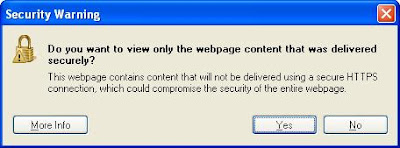

Say what???

In what felt like I passed out I had to re-read the full dialog, then took me about 5 seconds to get what the dialog was telling me and about 10 to understand what would happen if I clicked NO.

I'm copying the contents of dialog text here just for SEO

This webpage contains content that will not be delivered using a secure HTTPS connection, which could compromise the security of the entire webpage.

Why did they change the previous dialog?:

This page contains both secure and nonsecure items.
Do you want to display the nonsecure items?
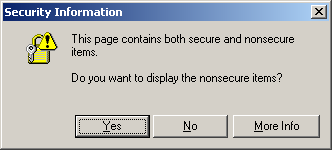


The new dialog seems very confusing to me, the extra text after the question just makes it even more confusing and for as long as I can remember we've had the same old dialog, which seemed fine.

Notice that even the answer is the opposite for the new dialog, maybe this is the reason it feels like asking a negative question.

I think the intent is for users to click the default yes, since 99.99% users don't really read any dialogs, and that will cause IE to not display the unsecure items on the page.