Showing posts with label IE. Show all posts

Saturday, June 13, 2009

What are those colors on IE tabs?

colored tabs

I thought this was one of the best features in Internet Explorer 8, but not everyone gets the meaning of the colors on the tabs. The colors represent that the tabs are related, meaning that you followed a link from one page, IE opened another tab and assigned the same color as the previous tab, so that way the tabs that are derived from other tabs are now all grouped and it’s very easy to see this, very useful when you have multiple tabs open for different purposes. I just had to blog this because someone actually asked me what those colors were for, so I figured there’s more people who may have the same question.

Friday, March 20, 2009

Do you want to view only the webpage content that was delivered securely?

keywords: IE8, usability, warning, error, dialog

Update: If you just care about making the dialog disappear go straight to comments or this post for more details, if you want the simple answers check the "simple guide". This post was originally intended for developers but it seems a lot of people are looking for an answer to this puzzle.

IE8 has been released and it's got a few really cool features as well as some really good protection mechanisms, all in all, a fairly good release.

But then I found this while navigating a secure page (Gmail)
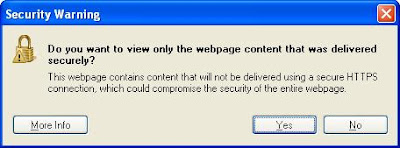

Say what???

In what felt like I passed out I had to re-read the full dialog, then took me about 5 seconds to get what the dialog was telling me and about 10 to understand what would happen if I clicked NO.

I'm copying the contents of dialog text here just for SEO

This webpage contains content that will not be delivered using a secure HTTPS connection, which could compromise the security of the entire webpage.

Why did they change the previous dialog?:

This page contains both secure and nonsecure items.
Do you want to display the nonsecure items?
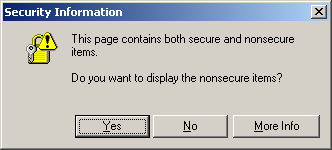


The new dialog seems very confusing to me, the extra text after the question just makes it even more confusing and for as long as I can remember we've had the same old dialog, which seemed fine.

Notice that even the answer is the opposite for the new dialog, maybe this is the reason it feels like asking a negative question.

I think the intent is for users to click the default yes, since 99.99% users don't really read any dialogs, and that will cause IE to not display the unsecure items on the page.

Wednesday, June 06, 2007

Filemon saves the day once again

I'm back, I had a head injury during a soccer game, I was very dizzy for over a week, but it's all good now

This time it was an ActiveX control (we're still fighting with ActiveX controls), I thought I had done everything I needed to do to get it up and working, but it would simply not load, so I loaded Filemon to see if it was even referencing the dll file, and it found two references, one to the GAC folder, and one to the program files\Internet Explorer, but no reference to where we actually copied the dll.

So I decided to copy the dll to where IE was looking for it, I copied the file to
c:\program files\Internet Explorer\
and everything started working wonderfully

I guess I could've added it to the GAC too, but I was very frustrated at that point since I thought I had tried that before and still wasn't working.

anyway... I guess that's another trick you can try when you have tried everything else deploying your ActiveX control, use filemon to see where IE is actually trying to load your dll from, and copy it there

and if you still don't know what filemon is, you owe it to your self, it's an amazing tool, it will save you many hours of headache (just not the ones caused by injuries during a soccer game J)