This Information Disclosure vulnerability could allow an attacker to bypass ASP.Net security and gain unauthorized access to objects in the Application folders explicitly by name. Note that this vulnerability would not allow an attacker to execute code or to elevate their user rights directly, but it could be used to produce useful information that could be used to try to further compromise the affected system.
Thursday, July 13, 2006
Time to update .NET 2.0


Wednesday, July 12, 2006

Tuesday, July 11, 2006
Singleton Pattern the way you should NOT do it
found this code today at c-sharp corner
public static SingleTon GetObject(){
if(instance == null)
instance = new SingleTon();
++m_nNofReference;
return instance;
}
don't use it, it is not thread safe, you can read this instead if you want to learn about the singleton pattern
"googling" officially a verb now
"This week googling officially became a verb. The 11th edition of the Merriam-Webster Collegiate Dictionary now includes “googling” (lower case g). Actually the Oxford English Dictionary (OED) beat them to the punch a month ago by listing Google (upper case g) in their authoritative lexicon of the English language. It’s about time. People have been using Google as a verb for years, despite protestations by the company (many of which I authored myself) about the genericization of the trademarked name."
check it out
check it out
technorati tags:google
Thursday, July 06, 2006
Monday, July 03, 2006

Tuesday, June 27, 2006
what should I hide?
I'm going through Code Complete 2 and got to this key point on chapter 5 about hiding information
"Get into the habit of asking "What should I hide?" You'll be surprised at how many difficult design issues dissolve before your eyes."
I think it should be quite the opposite, you should be in the habit of hiding everything and asking your self "what should I show?"; in C# if you omit the access modifier it defaults to private, and that's there for a good reason
You have to think in terms of what would someone else do, if they were trying to mess up with your code or get that precious information that your project is accessing
Of course not all projects are that critical that you should worry about securing every single aspect of the application, but you should get into the habit of hiding as much as possible and only making visible what you actually need, that way you'll be programming in a more secure way by default without even thinking about it
"Get into the habit of asking "What should I hide?" You'll be surprised at how many difficult design issues dissolve before your eyes."
I think it should be quite the opposite, you should be in the habit of hiding everything and asking your self "what should I show?"; in C# if you omit the access modifier it defaults to private, and that's there for a good reason
You have to think in terms of what would someone else do, if they were trying to mess up with your code or get that precious information that your project is accessing
Of course not all projects are that critical that you should worry about securing every single aspect of the application, but you should get into the habit of hiding as much as possible and only making visible what you actually need, that way you'll be programming in a more secure way by default without even thinking about it
Monday, June 26, 2006
share keyboard and mouse accross computers (software driven)
This little tool allows you to share your keyboard and mouse accross multiple computers, even with different Operating Systems loaded, that's pretty dang cool
the only thing is that the configuration part of it is really buggy and makes the program die after it gives you the error message, basically you have to use the default options or it will crash
but after you get it working it does just what is supposed to without getting in the way, you don't have to switch from your laptop to your regular pc keyboard and back...
basically what you have to do is
- install the server in the machine where the keyboard and mouse is hooked phisically and
- install the client on the machines where you want to use the same keyboard
- then you start the app on the server,
- chose the "share this computer's keyboard and mouse",
- click the configure button,
- add the "screens" (machines), in that screen you can specify if there are some corners where you don't want the mouse to go over to the other machine, just make sure you specify a size greater than zero, or it won't work
-once you add your screens (normally 2), you go to the links
where you specify something like:
0 to 100% of the "right" of "main pc" goes to 0 to 100% of "secondary"
basically saying the right part of the monitor on "main pc" goes to the other pc; you have to specify the other way too
0 to 100% of the "left" of "secondary" goes to 0 to 100% of "main pc"
click start (in both computers) and you're good to go, if you need to change the config, close the program (in both sides) open it again, and go in the configuration button (in the server only)
I'm loving it =oP
the only thing is that the configuration part of it is really buggy and makes the program die after it gives you the error message, basically you have to use the default options or it will crash
but after you get it working it does just what is supposed to without getting in the way, you don't have to switch from your laptop to your regular pc keyboard and back...
basically what you have to do is
- install the server in the machine where the keyboard and mouse is hooked phisically and
- install the client on the machines where you want to use the same keyboard
- then you start the app on the server,
- chose the "share this computer's keyboard and mouse",
- click the configure button,
- add the "screens" (machines), in that screen you can specify if there are some corners where you don't want the mouse to go over to the other machine, just make sure you specify a size greater than zero, or it won't work
-once you add your screens (normally 2), you go to the links
where you specify something like:
0 to 100% of the "right" of "main pc" goes to 0 to 100% of "secondary"
basically saying the right part of the monitor on "main pc" goes to the other pc; you have to specify the other way too
0 to 100% of the "left" of "secondary" goes to 0 to 100% of "main pc"
click start (in both computers) and you're good to go, if you need to change the config, close the program (in both sides) open it again, and go in the configuration button (in the server only)
I'm loving it =oP
Tuesday, June 20, 2006
.9 = 1
this post has generated so many comments and is so interesting (if you're not that good at math) you have to check it out
the point is simple:
.9 (repeating) = 1
not just close to 1... it is 1, if you don't believe it go check it out
Saturday, June 17, 2006
VS2005 Set Multiple Startup projects
To set multiple startup projects
1. In Solution Explorer, select the solution.
2. On the Project menu, click Properties. The Solution Property Pages Dialog Box opens.
3. Expand the Common Properties node, and click Startup Project.
4. Click Multiple Startup Projects and set the project actions.
How to: Set Multiple Startup Projects
This is more of a note for my self, but I'm sure a lot of people doesn't know about this feature, supposedly even the debugger attaches to the multiple projects, that's really useful when developing multi layered projectstechnorati tags:visual-studio, tips, tricks
Visual Studio Environment Animation Speed
this is a little trick I hadn't heard of, some items in the Visual Studio IDE have animation, e.g. when you open/close the properties, solution explorer, etc windows, there is some animation to make the windows appear/dissapear, sure is visually nice, but if you're like me, you don't want little whistles taking up your computer resources, I've seen those animation get quite slow specially when I have my machine loaded with a bunch of other stuff
there is a way to speed up those animations or even disable them completly
in the menu Tools, Options, Environment, General
bump "animation speed" all the way up, or uncheck the "animate environment tools" checkbox to disable this feature
this applies to both VS2003 and VS2005
Wednesday, June 14, 2006
blogging from flock
this is just a test from the flock browser, it has built in blogging capabilities and some other goodies, is based on Firefox, so check it out
Friday, June 09, 2006
World Cup live scores and schedules from google
Yesterday Edgar posted about a little program written by Microsoft to keep track of scores and stuff on the World Cup, and I just noticed that google has created something similar, but right into their web page
nice!
MSDN VS2005 & 2.0 framework Wiki
this is nice, Visual Studio 2005 and the .NET framework 2.0 documentation now on a wiki where everyone can collaborate
good job MS
good job MS
Thursday, June 08, 2006
browser sync for Firefox
"Google Browser Sync for Firefox is an extension that continuously synchronizes your browser settings – including bookmarks, history, persistent cookies, and saved passwords – across your computers. It also allows you to restore open tabs and windows across different machines and browser sessions."
I don't know that I could use this, but probably some people would find it useful, I prefer to use delicious for that kind of thing, but anyway...
notice how it is only for Firefox... evil google!
I don't know that I could use this, but probably some people would find it useful, I prefer to use delicious for that kind of thing, but anyway...
notice how it is only for Firefox... evil google!
Wednesday, May 31, 2006
Visual Studio 2005 Team Edition for Database Professionals
that's a heck of a name but oh well, you should be used to it by now; the point is, this looks very promising
The new Visual Studio Database Project allows you to import your database schema and place it under source control. When the time comes to deploy schema changes the new project system allows you to quickly build update scripts or packages and then provides a mechanism to deploy them to the database of our choice
Rename Refactoring allows you to easily rename any object in your database and be assured that all references to that object will be renamed to correspond to the change
DataCompare allows you to quickly compare two databases and script updates to bring the data in these databases into sync
and a lot more, check it out
hint: the page looks better in IE (than it does in FireFox) but don't let that discourage you
The new Visual Studio Database Project allows you to import your database schema and place it under source control. When the time comes to deploy schema changes the new project system allows you to quickly build update scripts or packages and then provides a mechanism to deploy them to the database of our choice
Rename Refactoring allows you to easily rename any object in your database and be assured that all references to that object will be renamed to correspond to the change
DataCompare allows you to quickly compare two databases and script updates to bring the data in these databases into sync
and a lot more, check it out
hint: the page looks better in IE (than it does in FireFox) but don't let that discourage you
(not) managing developers
if you are managing developers or are thinking into moving in such position, be it software manager or assistant software manager, or something related to that (like managing overseas developers), this is definetely a must read
"The catch-22 of software management is that the ones who want it most are usually the worst at it. Some people, for worse or for worst, want to be managers because it gives them power over their peers. There's nothing good that can come of this arrangement: you should never give power to someone who craves it, for reasons that I hope are obvious."
"Unfortunately, many tech companies do exactly that, because they don't know any better."
I couldn't agree more, I guess developers can benefit from this as well, perhaps pass it on. you can find the article here
"The catch-22 of software management is that the ones who want it most are usually the worst at it. Some people, for worse or for worst, want to be managers because it gives them power over their peers. There's nothing good that can come of this arrangement: you should never give power to someone who craves it, for reasons that I hope are obvious."
"Unfortunately, many tech companies do exactly that, because they don't know any better."
I couldn't agree more, I guess developers can benefit from this as well, perhaps pass it on. you can find the article here
I'm back
not that I ever wrote on my blog that I was leaving on vacation, but anyway... I had a great time in Mexico, specifically in Juarez, Chihuahua and Cuauhtemoc (Chihuahua) with most of my family, unfortunately I missed some friends, which sucks because I don't get to go back very often...
Juarez is a great city to visit, there are tons of things to do there and the food is really good
I'm still catching up on reading blogs and stuff, I've found some good posts... back to reality
Juarez is a great city to visit, there are tons of things to do there and the food is really good
I'm still catching up on reading blogs and stuff, I've found some good posts... back to reality
Monday, May 22, 2006
Free Intellisense for SQL Query Analyzer
 for those of you who can't type fast intellisense lovers
couple this with my SQL Connection manager and you're good to go (I know, lame name)
- Code completion for fast, accurate script building
- Discoverability in SQL Server query creation
- Keyword formatting, code snippet integration other extended features
- FREE until 1st September 2006
- No time-bombs, no restrictions
Friday, May 19, 2006
simple elegant way to read ini files (Delphi)
I still see people do weird things to load settings from an .ini file; I always use this method
uses
IniFiles;
...
with TIniFile.Create(Application.ExeName) do
try
//load the settings here
finally
Free
end
nice, short, clean and simple
my thing is whenever I find something simpler or nicer than the way I do things, I change to that new way and stick to that, I think that's a simple principle to keep on becoming better developer
uses
IniFiles;
...
with TIniFile.Create(Application.ExeName) do
try
//load the settings here
finally
Free
end
nice, short, clean and simple
my thing is whenever I find something simpler or nicer than the way I do things, I change to that new way and stick to that, I think that's a simple principle to keep on becoming better developer
Thursday, May 18, 2006
Tuesday, May 16, 2006
obfuscating the QueryString (just don't)
I just read this post by Peter A Bromberg, where he suggests that you can obfuscate the Query string to pass sensitive data around by "performing ASCII-to-HEX scrambling"; the guy usually has good ideas, but this one, please just don't use it, security through obscurity is not security
Friday, May 12, 2006
agile lunch?
I just read a post by Brendan Tompkins titled Agile HR; at work, we (the group of developers on our division) usually try to go out for lunch on Thursdays and yesterday we were going in two different cars and one guy said "remember that we have to go in pairs" (to get some discount because they had some coupon) to which I immediately replied "so this is going to be Agile lunch?"
then we started talking about agile practices and what we liked and didn't like, I won't post that here because I would probably get flamed, but anyway...
we're such geeks... do you guys do agile lunch?
then we started talking about agile practices and what we liked and didn't like, I won't post that here because I would probably get flamed, but anyway...
we're such geeks... do you guys do agile lunch?
Saturday, April 29, 2006
Assign permissions early
Last week I decided to restrict the access to one of the drives on my main pc, an 80GB drive with quite a bit of files in it, I took so many hours that I had to go to sleep before it was done
it reminded me that we should always assign permissions as early as possible, in the case of disk drives the bigger and more files you have on them, the longer it will take to complete the operation because it has to adjust permissions to every single file on the drive
the same concept applies when developing, but the problem in this case is that YOU (not an automated tool) will have to adjust the security, this may require a change on the architecture, which then introduces bugs, whichs costs time and resources... it can get quite ugly
assign permissions early wherever it applies, it will save you a lot of resources on the future
it reminded me that we should always assign permissions as early as possible, in the case of disk drives the bigger and more files you have on them, the longer it will take to complete the operation because it has to adjust permissions to every single file on the drive
the same concept applies when developing, but the problem in this case is that YOU (not an automated tool) will have to adjust the security, this may require a change on the architecture, which then introduces bugs, whichs costs time and resources... it can get quite ugly
assign permissions early wherever it applies, it will save you a lot of resources on the future
Monday, April 24, 2006
manage your SQL connections in one place
where I work at I use about 10 different SQL servers, is hard to keep up with the server names, catalogs, user names and passwords required for each one
wouldn't be nice if I had a central place to access all of them without having to remember all the names/catalogs/user names/passwords, but most importantly, without having to type the same stuff over and over to open my connections in Query Analizer?
even if you use SSPI to access your servers, you'd still have to type the server name and select the database you want to access
that's why I wrote this little utility program, you enter your SQL servers along with the user names, passwords and databases that you want to access and it sits quietly on your tray, where you can access them quickly
you can configure it to open the connections on an existing Query Analizer window, or to open a new one each time you open a connection
when configuring a new connection you can configure which file you want to load, e.g. if you regularly run some queries against certain database, this option would help you
now, if you're worried about security, I added a password to keep all this information encrypted using industry standards
this is a freeware application, it gets the job done for me, suggestions are welcome but I don't guarantee anything
wouldn't be nice if I had a central place to access all of them without having to remember all the names/catalogs/user names/passwords, but most importantly, without having to type the same stuff over and over to open my connections in Query Analizer?
even if you use SSPI to access your servers, you'd still have to type the server name and select the database you want to access
that's why I wrote this little utility program, you enter your SQL servers along with the user names, passwords and databases that you want to access and it sits quietly on your tray, where you can access them quickly
you can configure it to open the connections on an existing Query Analizer window, or to open a new one each time you open a connection
when configuring a new connection you can configure which file you want to load, e.g. if you regularly run some queries against certain database, this option would help you
now, if you're worried about security, I added a password to keep all this information encrypted using industry standards
this is a freeware application, it gets the job done for me, suggestions are welcome but I don't guarantee anything
Wednesday, April 19, 2006
bare minimum required comments for your projects
commenting is one of the things that programmers/developers really suck at
but please, do your self a favor
at the VERY LEAST, put comments at the top of the main source file; for example whenever I start a new project I always put something like:
Program: Program Name
Written by: Eber Irigoyen
on: 04/19/2006
Uses (third party components):
- Indy 9.0.14
- XceedZip 4.5.77.0
- MDAC 2.7
Compiled with: Delphi 7
Description:
- blablabla
- more bla
- etc...
include any history updates here...
is just a few lines and it tells me quite a lot, how many times have you spent hours just because you don't know what version of the X components some co-worker used?
adding these headers will take you only a minute or two, and it can save countless hours in the future
the next thing is whenever you make changes to your project, at least include a description at the top of the main file, along with the version number, your name and date when the update was done
simple things like this are part of being a better developer
note: Updated the article to clarify some points just like Ayende mentions in the comments, another thing is that you should include the 3rd party components in the source repository;
the bare minimum comments in the source and the components in the source repository are real life savers!
but please, do your self a favor
at the VERY LEAST, put comments at the top of the main source file; for example whenever I start a new project I always put something like:
Program: Program Name
Written by: Eber Irigoyen
on: 04/19/2006
Uses (third party components):
- Indy 9.0.14
- XceedZip 4.5.77.0
- MDAC 2.7
Compiled with: Delphi 7
Description:
- blablabla
- more bla
- etc...
include any history updates here...
is just a few lines and it tells me quite a lot, how many times have you spent hours just because you don't know what version of the X components some co-worker used?
adding these headers will take you only a minute or two, and it can save countless hours in the future
the next thing is whenever you make changes to your project, at least include a description at the top of the main file, along with the version number, your name and date when the update was done
simple things like this are part of being a better developer
note: Updated the article to clarify some points just like Ayende mentions in the comments, another thing is that you should include the 3rd party components in the source repository;
the bare minimum comments in the source and the components in the source repository are real life savers!
Thursday, April 13, 2006
Friday, April 07, 2006
how to use google as a dictionary/encyclopedia
in this world of acronyms and new terms everyday we can't keep up with all those things, that's where google comes to the rescue
at the search box just type
define:your term here
here are some samples and their results:
define:google
Google, a popular search engine, is a tool for finding resources on the World Wide Web. Google scans web pages to find instances of the keywords you have entered in the search box.
define:Microsoft Corporation
An incredibly successful supplier of computer software founded in 1975 by Bill Gates and his partner Paul Allen. Microsoft has grown to become the world leader in the software industry by supplying software to the world’s largest computer base (IBM-compatibles). A large portion of Microsoft’s success is due to its popular Windows operating environment.
define:Test Driven Development
Testing methodology associated with Agile Programming in which every chunk of code is covered by unit tests, which must all pass all the time, in an effort to eliminate unit-level and regression bugs during development. Practitioners of TDD write a lot of tests, ie an equal number of lines of test code to the size of the production code.
as you can see you can enter more than a single word to find the definition
now, it gets interesting, you can also enter things like file formats, ZIP, PDF, EXE and get a definition for those as well
define:pdf
Portable Document Format. An electronic document that must be read with the Adobe Acrobat computer program.
define:js
An external JavaScript file. One of the methods of implementing JavaScript on to a page is to write an independent file containing all methods and variables and store it as a .js file. This file is then imported into an HTML or other type of web page as and when required.
how cool is that!
you can also use it as an encyclopedia
define:Salt Lake City
# Salt Lake City is the state capital and most populous city in the U.S. state of Utah. Its population as of the 2000 Census was 181,743. The Salt Lake City-Ogden metropolitan area, defined as Salt Lake, Davis, and Weber counties, had a population of 1,333,914 as of 2000.
define:George Bush
# Bush: 43rd President of the United States; son of George Herbert Walker Bush (born in 1946)
# Bush: vice president under Reagan and 41st President of the United States (born in 1924)
nice!, you can also use it to find acronyms (HTML, WEB, CSS, etc), jeez, how easy is for kids to do homework these days
you might not always get the definition on the first result, but I've seen good results usually in the top 3 definitions
you also get a list of related phrases which may give you a more detailed result on whatever it is you are looking for
at the search box just type
define:your term here
here are some samples and their results:
define:google
Google, a popular search engine, is a tool for finding resources on the World Wide Web. Google scans web pages to find instances of the keywords you have entered in the search box.
define:Microsoft Corporation
An incredibly successful supplier of computer software founded in 1975 by Bill Gates and his partner Paul Allen. Microsoft has grown to become the world leader in the software industry by supplying software to the world’s largest computer base (IBM-compatibles). A large portion of Microsoft’s success is due to its popular Windows operating environment.
define:Test Driven Development
Testing methodology associated with Agile Programming in which every chunk of code is covered by unit tests, which must all pass all the time, in an effort to eliminate unit-level and regression bugs during development. Practitioners of TDD write a lot of tests, ie an equal number of lines of test code to the size of the production code.
as you can see you can enter more than a single word to find the definition
now, it gets interesting, you can also enter things like file formats, ZIP, PDF, EXE and get a definition for those as well
define:pdf
Portable Document Format. An electronic document that must be read with the Adobe Acrobat computer program.
define:js
An external JavaScript file. One of the methods of implementing JavaScript on to a page is to write an independent file containing all methods and variables and store it as a .js file. This file is then imported into an HTML or other type of web page as and when required.
how cool is that!
you can also use it as an encyclopedia
define:Salt Lake City
# Salt Lake City is the state capital and most populous city in the U.S. state of Utah. Its population as of the 2000 Census was 181,743. The Salt Lake City-Ogden metropolitan area, defined as Salt Lake, Davis, and Weber counties, had a population of 1,333,914 as of 2000.
define:George Bush
# Bush: 43rd President of the United States; son of George Herbert Walker Bush (born in 1946)
# Bush: vice president under Reagan and 41st President of the United States (born in 1924)
nice!, you can also use it to find acronyms (HTML, WEB, CSS, etc), jeez, how easy is for kids to do homework these days
you might not always get the definition on the first result, but I've seen good results usually in the top 3 definitions
you also get a list of related phrases which may give you a more detailed result on whatever it is you are looking for
Thursday, April 06, 2006
how to get database connection using a Delphi personal version?
This question comes up very often in the Delphi forums
the bad news is that the personal versions of Delphi don't come bundled with database components, you have to use a third party solution, the good news is that there are a few free ones, here's one of them
http://www.deer-soft.com/
and here's a tutotial from delphi.about about working around this limitation using text files, typed files, etc, in a few cases, these methods might be enough for your application
Creating flat (non-relational) databases with no (Delphi) database components
the bad news is that the personal versions of Delphi don't come bundled with database components, you have to use a third party solution, the good news is that there are a few free ones, here's one of them
http://www.deer-soft.com/
and here's a tutotial from delphi.about about working around this limitation using text files, typed files, etc, in a few cases, these methods might be enough for your application
Creating flat (non-relational) databases with no (Delphi) database components
loading another copy of an assembly on Reflector might cause little headaches
First of all, if you haven't used Reflector, go download it now and start looking around in the BCL assemblies to see how things are really done behind the scenes, it can decompile code to IL, C#, VB.NET, Delphi, Chrome and MC++, I can't really say much about the quality of the Delphi and Chrome versions of the code it generates, but the C# is pretty good
anyway...
one thing to be aware when using reflector is, if you have an assembly loaded, and you try to load a different copy of the assembly in a different directory, it won't load it, it will keep the previous assembly loaded, and if you were loading it to see if there was a mismatch you'll think they're equal
what you have to do is just to right click on the assembly you're trying to reload, select close, then open the other copy and you're good to go
anyway...
one thing to be aware when using reflector is, if you have an assembly loaded, and you try to load a different copy of the assembly in a different directory, it won't load it, it will keep the previous assembly loaded, and if you were loading it to see if there was a mismatch you'll think they're equal
what you have to do is just to right click on the assembly you're trying to reload, select close, then open the other copy and you're good to go
Vendor's voices on Delphi's future
check out what the vendors have to say about the future of Delphi, a lot more optimistic than I expected in the sense that they will support their products throughout whatever Delphi versions come out, which is good for the Delphi community
check out what the vendors have to say about the future of Delphi, a lot more optimistic than I expected in the sense that they will support their products throughout whatever Delphi versions come out, which is good for the Delphi community
Wednesday, April 05, 2006
Windows Live Mail rocks
full blown (AJAX, web 2.0 or whatever you want to call it) email client, very, very nice
you can have email views like the ones in outlook 2003, you can do multiple selection with the mouse, drag and drop, it has spelling built in... definitely worth it giving it a try
full blown (AJAX, web 2.0 or whatever you want to call it) email client, very, very nice
you can have email views like the ones in outlook 2003, you can do multiple selection with the mouse, drag and drop, it has spelling built in... definitely worth it giving it a try
To use stored procedures or not to use stored procedures
I thought this battle was settled down, and we had all agreed that stored procedures (from now on called SPs) are (for the most part) the way to go when accessing your SQL data
turns out Ayende is not quite convinced yet, in fact it seems he prefers to use no stored procedures at all, I told him SPs can give you scalability, flexibility, security, etctirity, and here's his response
"I completely disagree with this, if you didn't catch on so far. Here is my refutal:
Scalability:
There is no performance advantages to using SP over Parameterized SQL.
Scaling the database is much harder than scaling an application.
Note: I implemented a caching web service once that simply cache data for certain period of time, saving quite a bit from the poor database. Deploy a bunch of those, and you're seriously reduced the amount of work the database has to do.
Flexibility:
Stored Procedures are... Well, procedures. This means that you've all the advantages and disadvantages of procedural programming. On general, I wouldn't call it very flexible. Changing the procedure's internal can be done without breaking clients is possible within a certain set of changes, but major stuff is hard.
A search procedure should be flexible, you should be able to search by any combination of parameters, how easy it is to write this procedure?
Security:
Not applicable in situations where you don't give users direct access to the database, in my opinion. There are things to be said about defense in depth, but I don't think that they should be curried to the point where you are forced to give up significant advantages while keeping the security of the system (using views / triggers instead of procedures, for instance, can result in a situation just as safe, and far easier for the programmers to work with effectively)."
let's see
"Scalability:
There is no performance advantages to using SP over Parameterized SQL. "
...you probably posted that in the incorrect section, Scalability and performance are different things
"Scaling the database is much harder than scaling an application. "
that's just another reason to separate the data rules (SPs) from your application
"Note: I implemented a caching web service once that simply cache data for certain period of time, saving quite a bit from the poor database. Deploy a bunch of those, and you're seriously reduced the amount of work the database has to do. "
you can still cache the result of the stored procedures, I don't see how that's an advantage of not-using-stored-procedures
"Flexibility:
Stored Procedures are... Well, procedures. This means that you've all the advantages and disadvantages of procedural programming. On general, I wouldn't call it very flexible. Changing the procedure's internal can be done without breaking clients is possible within a certain set of changes, but major stuff is hard. "
even if they are just a few, I still didn't have to recompile (and potentially distribute the application) just to make those little changes
"A search procedure should be flexible, you should be able to search by any combination of parameters, how easy it is to write this procedure? "
just as easy as it is to write a query on the app, besides that, I can make important changes to the stored procedures, perhaps look in other tables (history, cache, etc), take other parameters to use the same SP in another application, etc; again, without having to recompile my app
"Security:
Not applicable in situations where you don't give users direct access to the database, in my opinion. There are things to be said about defense in depth, but I don't think that they should be curried to the point where you are forced to give up significant advantages while keeping the security of the system (using views / triggers instead of procedures, for instance, can result in a situation just as safe, and far easier for the programmers to work with effectively). "
secure programming is all about good practices, the stupid SQL injection is because people just do
"select * from users where userName = "+UserID
if they would've used a stored procedure, that would've been ok, the same thing would've been accomplished by using a parameterized query as you point out
but is much more than that, security is not only who can get access to your data, is who can mess up with your data, and changes to that are far easier accomplished using SPs; is the exact same concept you use when you break up your code in files and classes, you give each class a responsability (I hope), is the same thing with the database, you give the database it's responsability and let your application do it's responsability. it's about using the right tool to get the job done
I thought this battle was settled down, and we had all agreed that stored procedures (from now on called SPs) are (for the most part) the way to go when accessing your SQL data
turns out Ayende is not quite convinced yet, in fact it seems he prefers to use no stored procedures at all, I told him SPs can give you scalability, flexibility, security, etctirity, and here's his response
"I completely disagree with this, if you didn't catch on so far. Here is my refutal:
Scalability:
There is no performance advantages to using SP over Parameterized SQL.
Scaling the database is much harder than scaling an application.
Note: I implemented a caching web service once that simply cache data for certain period of time, saving quite a bit from the poor database. Deploy a bunch of those, and you're seriously reduced the amount of work the database has to do.
Flexibility:
Stored Procedures are... Well, procedures. This means that you've all the advantages and disadvantages of procedural programming. On general, I wouldn't call it very flexible. Changing the procedure's internal can be done without breaking clients is possible within a certain set of changes, but major stuff is hard.
A search procedure should be flexible, you should be able to search by any combination of parameters, how easy it is to write this procedure?
Security:
Not applicable in situations where you don't give users direct access to the database, in my opinion. There are things to be said about defense in depth, but I don't think that they should be curried to the point where you are forced to give up significant advantages while keeping the security of the system (using views / triggers instead of procedures, for instance, can result in a situation just as safe, and far easier for the programmers to work with effectively)."
let's see
"Scalability:
There is no performance advantages to using SP over Parameterized SQL. "
...you probably posted that in the incorrect section, Scalability and performance are different things
"Scaling the database is much harder than scaling an application. "
that's just another reason to separate the data rules (SPs) from your application
"Note: I implemented a caching web service once that simply cache data for certain period of time, saving quite a bit from the poor database. Deploy a bunch of those, and you're seriously reduced the amount of work the database has to do. "
you can still cache the result of the stored procedures, I don't see how that's an advantage of not-using-stored-procedures
"Flexibility:
Stored Procedures are... Well, procedures. This means that you've all the advantages and disadvantages of procedural programming. On general, I wouldn't call it very flexible. Changing the procedure's internal can be done without breaking clients is possible within a certain set of changes, but major stuff is hard. "
even if they are just a few, I still didn't have to recompile (and potentially distribute the application) just to make those little changes
"A search procedure should be flexible, you should be able to search by any combination of parameters, how easy it is to write this procedure? "
just as easy as it is to write a query on the app, besides that, I can make important changes to the stored procedures, perhaps look in other tables (history, cache, etc), take other parameters to use the same SP in another application, etc; again, without having to recompile my app
"Security:
Not applicable in situations where you don't give users direct access to the database, in my opinion. There are things to be said about defense in depth, but I don't think that they should be curried to the point where you are forced to give up significant advantages while keeping the security of the system (using views / triggers instead of procedures, for instance, can result in a situation just as safe, and far easier for the programmers to work with effectively). "
secure programming is all about good practices, the stupid SQL injection is because people just do
"select * from users where userName = "+UserID
if they would've used a stored procedure, that would've been ok, the same thing would've been accomplished by using a parameterized query as you point out
but is much more than that, security is not only who can get access to your data, is who can mess up with your data, and changes to that are far easier accomplished using SPs; is the exact same concept you use when you break up your code in files and classes, you give each class a responsability (I hope), is the same thing with the database, you give the database it's responsability and let your application do it's responsability. it's about using the right tool to get the job done
Tuesday, April 04, 2006
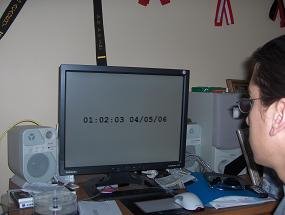
010203040506
as a way of *celebration* for this peculiar event I created a big clock, a version in Delphi and a version in C#
you can get the code here and here, not much really but you could re-use it in 04/05/2106

the picture was actually taken at 01:02:03 04/05/06
...I'm such a geek
update: I made a change to the code to "freeze time" at whatever time configured, that's a nice touch, now I can use that for other count downs, I'll put up the new versions
Monday, April 03, 2006
don't miss the 01:02:03 04/05/06
On Wednesday of this week, two minutes and three seconds after 1:00 in the morning, the time and date will be
01:02:03 04/05/06
this event happens every 100 years, since we use two digits for the year
for most other countries the date will be on May 4, since they use DD/MM/YYYY
On Wednesday of this week, two minutes and three seconds after 1:00 in the morning, the time and date will be
01:02:03 04/05/06
this event happens every 100 years, since we use two digits for the year
for most other countries the date will be on May 4, since they use DD/MM/YYYY
Saturday, April 01, 2006
April fools summary
check it out right here
http://en.wikipedia.org/wiki/April_1,_2006
one of the first ones that came out is this one from Microsoft
http://www.msnsearchspoof.com/
where you can setup a page that will simulate MSN search site, go play a good prank on your co-workers
check it out right here
http://en.wikipedia.org/wiki/April_1,_2006
one of the first ones that came out is this one from Microsoft
http://www.msnsearchspoof.com/
where you can setup a page that will simulate MSN search site, go play a good prank on your co-workers
Friday, March 31, 2006
(SQL) should I use #temp table or a @table variable?
I found this great article about all the advantages and disadvantages between #temp, ##temp, @temp, temp tables
definitely worth reading, or course is part of my delicious feed too
I found this great article about all the advantages and disadvantages between #temp, ##temp, @temp, temp tables
definitely worth reading, or course is part of my delicious feed too
(SQL) How do I update only the top # rows from a table?
This can be specially handy when you are testing your data, but it can apply to many production cases as well, I've seen people invent so many ways to do this, but here's a simple way of doing it
set rowcount 100
update YourTable set SomeField = 'Something' where SomeField is null
set rowcount 0
it is very important that you run set rowcount 0 after finishing whatever you needed rowcount for, else any other query (select, updates, etc) that you run will only run for the first # records and it can really give you some headaches, so whenever you write
set rowcount #
write
set rowcount 0
immediatly after that, then write the query in the middle that requires to be ran with the limited rowcount
This can be specially handy when you are testing your data, but it can apply to many production cases as well, I've seen people invent so many ways to do this, but here's a simple way of doing it
set rowcount 100
update YourTable set SomeField = 'Something' where SomeField is null
set rowcount 0
it is very important that you run set rowcount 0 after finishing whatever you needed rowcount for, else any other query (select, updates, etc) that you run will only run for the first # records and it can really give you some headaches, so whenever you write
set rowcount #
write
set rowcount 0
immediatly after that, then write the query in the middle that requires to be ran with the limited rowcount
Favorite features in .NET 2.0
Edgar posted today about one of the new functions in .NET 2.0 to make your life easier, like using
aString.IsNullOrEmpty()
instead of
aString != null && aString != "";
it reminded me about this video from Kit George where he shows some of the new cool little functions that will help you a lot
in .NET 2.0 you can now use:
if (aString.Contains(otherString))
instead of:
if (aString.IndexOf(otherString)<>0)
or
foreach(string line in File.ReadAllLines("c:\theFilePath"))
Console.WriteLine(line)
instead of:
string line;
using (StreamReader sr = new StreamReader("c:\TheFilePath")) {
while ((line = sr.ReadLine()) != null)
Console.WriteLine(line);
}
check out the video to learn more about these and other features
you'll also find the link on my delicious feed under videos
Edgar posted today about one of the new functions in .NET 2.0 to make your life easier, like using
aString.IsNullOrEmpty()
instead of
aString != null && aString != "";
it reminded me about this video from Kit George where he shows some of the new cool little functions that will help you a lot
in .NET 2.0 you can now use:
if (aString.Contains(otherString))
instead of:
if (aString.IndexOf(otherString)<>0)
or
foreach(string line in File.ReadAllLines("c:\theFilePath"))
Console.WriteLine(line)
instead of:
string line;
using (StreamReader sr = new StreamReader("c:\TheFilePath")) {
while ((line = sr.ReadLine()) != null)
Console.WriteLine(line);
}
check out the video to learn more about these and other features
you'll also find the link on my delicious feed under videos
my del.icio.us feed
in case you haven't (heard of, or) used this yet, it is definitely a must, for those of you that don't know that del.icio.us is, is a place where you store your favorites (links) and you can attach TAGS to them, it creates a page for you with your list of favorites and you can quickly filter for what you are looking for using the TAGS you assigned when you added the link
this has many advantages, how many times have you tried to synchronize a list of favorites between more than one computer, or maybe you are with someone else and you know you have a site on your favorites list that you need right now...
del.icio.us will do that for you, pretty simple concept, but it is really powerful
if I didn't do a good job describing what del.icio.us is, here's the definition from the de.icio.us site itself
"What is del.icio.us?
del.icio.us is a collection of favorites - yours and everyone else's. Use del.icio.us to:
- Keep links to your favorite articles, blogs, music, restaurant reviews, and more on del.icio.us and access them from any computer on the web.
- Share favorites with friends, family, and colleagues.
- Discover new things. Everything on del.icio.us is someone's favorite - they've already done the work of finding it. Explore and enjoy."
here's my del.icio.us feed, I'll keep updating that
check del.icio.us out, I'm sure you'll find it usefull
in case you haven't (heard of, or) used this yet, it is definitely a must, for those of you that don't know that del.icio.us is, is a place where you store your favorites (links) and you can attach TAGS to them, it creates a page for you with your list of favorites and you can quickly filter for what you are looking for using the TAGS you assigned when you added the link
this has many advantages, how many times have you tried to synchronize a list of favorites between more than one computer, or maybe you are with someone else and you know you have a site on your favorites list that you need right now...
del.icio.us will do that for you, pretty simple concept, but it is really powerful
if I didn't do a good job describing what del.icio.us is, here's the definition from the de.icio.us site itself
"What is del.icio.us?
del.icio.us is a collection of favorites - yours and everyone else's. Use del.icio.us to:
- Keep links to your favorite articles, blogs, music, restaurant reviews, and more on del.icio.us and access them from any computer on the web.
- Share favorites with friends, family, and colleagues.
- Discover new things. Everything on del.icio.us is someone's favorite - they've already done the work of finding it. Explore and enjoy."
here's my del.icio.us feed, I'll keep updating that
check del.icio.us out, I'm sure you'll find it usefull
Saturday, March 25, 2006

Friday, March 24, 2006
"it won't affect anything"... on basic development rules: don't make assumptions
When you go to sleep you set the clock's alarm and you assume that it'll work and it'll wake you up in the morning, in some cases you'll setup two alarms assuming that if one doesn't work the other one will (I least I do that when I'm going to be traveling the next morning), when you are driving you drive through a green light assuming that no one is coming from the sides, because they have a red light, etc, etc, etc, at some point we assume something; we live by assumptions!
when we are programming is no different, many times we make assumptions, and quite often those assumptions translate into poorly performant software or users end up using your software in a way you didn't expect it to which translates into a bad experience because you didn't program the software to be used that way (you assumed a different use)
so it's all about assumptions, we assume that a connection will exist, that a file will be there, that a query will run...
do yourself a favor, think about the assumptions you make and try and remove them, this is FAR easier said than done, but just by being aware that you shouldn't make assumptions you will already be ahead of the game, I have been living (not only programming) by this concept for years and I still make assumptions that will *cost me* errors in the software I write, but it is definitely a lot less errors
a very huge assumptions that is made is
"it won't affect anything"
that's a big one, everyone's done it several times, so think back how many times you've said "it won't affect anything" and you ended up breaking the entire system, messing up the database, etc
sure, that's what testing is for, but first of all, if you introduced new bugs you end up wasting a lot more time that it was necessary and second, not everyone has a test team, and if you test your own software since you are pretty sure "it won't affect anything" you don't test your software that well
here's a list of common things that you SHOULD NOT assume
- your app can use all the RAM it needs
- your app can use all the DISK space it needs
- a file will exist
- you will have permissions to do X or Y (specially on web apps, accessing files, etc)
- your app will run under administrator privileges (this is a big one too)
- a connection will be present (TCP, HTTP, SQL, etc)
- a connection will not be dropped in the middle of things
- it won't affect anything
that's a small but pretty good list I think, start avoiding assumptions, I guarantee you will become a better developer that creates more reliable software faster
When you go to sleep you set the clock's alarm and you assume that it'll work and it'll wake you up in the morning, in some cases you'll setup two alarms assuming that if one doesn't work the other one will (I least I do that when I'm going to be traveling the next morning), when you are driving you drive through a green light assuming that no one is coming from the sides, because they have a red light, etc, etc, etc, at some point we assume something; we live by assumptions!
when we are programming is no different, many times we make assumptions, and quite often those assumptions translate into poorly performant software or users end up using your software in a way you didn't expect it to which translates into a bad experience because you didn't program the software to be used that way (you assumed a different use)
so it's all about assumptions, we assume that a connection will exist, that a file will be there, that a query will run...
do yourself a favor, think about the assumptions you make and try and remove them, this is FAR easier said than done, but just by being aware that you shouldn't make assumptions you will already be ahead of the game, I have been living (not only programming) by this concept for years and I still make assumptions that will *cost me* errors in the software I write, but it is definitely a lot less errors
a very huge assumptions that is made is
"it won't affect anything"
that's a big one, everyone's done it several times, so think back how many times you've said "it won't affect anything" and you ended up breaking the entire system, messing up the database, etc
sure, that's what testing is for, but first of all, if you introduced new bugs you end up wasting a lot more time that it was necessary and second, not everyone has a test team, and if you test your own software since you are pretty sure "it won't affect anything" you don't test your software that well
here's a list of common things that you SHOULD NOT assume
- your app can use all the RAM it needs
- your app can use all the DISK space it needs
- a file will exist
- you will have permissions to do X or Y (specially on web apps, accessing files, etc)
- your app will run under administrator privileges (this is a big one too)
- a connection will be present (TCP, HTTP, SQL, etc)
- a connection will not be dropped in the middle of things
- it won't affect anything
that's a small but pretty good list I think, start avoiding assumptions, I guarantee you will become a better developer that creates more reliable software faster
Thursday, March 23, 2006
on quick little tips: claim your computer memory (kinda manual garbage collector)
on my development machine at work I have Windows 2000 with 1GB of RAM, that used to be more than enough, but nowadays, programs are just getting more and more memory hungry
while you can leave your computer up without reboots for weeks and weeks, you'll notice the memory consuption to keep going up and up
here's a trick to claim some of that memory back so other programs can use it:
- restart a bunch of your windows services and stop (or even disable) the ones you're not using!
- restart (close and reopen) any web browsers that you are using
that's it...
now if you want more detail keep reading
to open the services console, click on Start, Run, type "services.msc" (without quotes of course!) hit enter
click on the "status" colum, so get all of the ones that are started all together
the first one is Automatic Updates, stopping this service will claim quite a bit of memory, if you are good are keeping an eye on updates, stop and disable this one and you'll have an extra 30MB of RAM for other things
here's a list of services that you can (most likely) safely restart without causing problems
- Machine Debug Manager
- Print Spooler
- Your antivirus, i.e. I have "Symantec Antivirus Client"
- Task Scheduler
- TCP/IP NetBIOS Helper Service
- VNC Server (in case you have VNC installed on your machine)
- IIS Admin Service (this will restart other services that depend on it)
- MSSQL* (there can be a number of these ones, depending on what version of MSSQL you have, you can restart them all)
other services you can restart, I haven't noticed much gain from restarting them though:
- Background Intelligent Transfer Service
- COM+ Event System
- Computer Browser
Services you can stop (or disable):
- IIS Admin Service (this will stop other services that depend on it)
- MSSQL* (if you have the 2005 version, you have a bunch of these ones, and they all take a lot of memory)
I usually stop IIS and MSSQL because I don't use them everyday, if you can't stop them because you always use them, at least restart them
if you don't use MSSQL or IIS, except in very few cases, you can even disable them, and then just reenable them whenever you need them
performing the above steps can claim back a bunch of RAM, I've seen 200 MB go back in my machine, but it can vary greatly
now, if you don't like doing that manually, you can always create a .BAT file to do all that for you, and then you could put a shortcut somewhere in your desktop or quick launch bar
to restart a service from a .BAT file you just enter something like:
net stop "Task Scheduler"
net start "Task Scheduler"
you do that, and you can claim a bunch of RAM every day with a single click
of course, nothing beats restarting the machine, but again, there might be services that you don't really use, so no need to have them enabled, and of course you can always use the RAM for other things
on my development machine at work I have Windows 2000 with 1GB of RAM, that used to be more than enough, but nowadays, programs are just getting more and more memory hungry
while you can leave your computer up without reboots for weeks and weeks, you'll notice the memory consuption to keep going up and up
here's a trick to claim some of that memory back so other programs can use it:
- restart a bunch of your windows services and stop (or even disable) the ones you're not using!
- restart (close and reopen) any web browsers that you are using
that's it...
now if you want more detail keep reading
to open the services console, click on Start, Run, type "services.msc" (without quotes of course!) hit enter
click on the "status" colum, so get all of the ones that are started all together
the first one is Automatic Updates, stopping this service will claim quite a bit of memory, if you are good are keeping an eye on updates, stop and disable this one and you'll have an extra 30MB of RAM for other things
here's a list of services that you can (most likely) safely restart without causing problems
- Machine Debug Manager
- Print Spooler
- Your antivirus, i.e. I have "Symantec Antivirus Client"
- Task Scheduler
- TCP/IP NetBIOS Helper Service
- VNC Server (in case you have VNC installed on your machine)
- IIS Admin Service (this will restart other services that depend on it)
- MSSQL* (there can be a number of these ones, depending on what version of MSSQL you have, you can restart them all)
other services you can restart, I haven't noticed much gain from restarting them though:
- Background Intelligent Transfer Service
- COM+ Event System
- Computer Browser
Services you can stop (or disable):
- IIS Admin Service (this will stop other services that depend on it)
- MSSQL* (if you have the 2005 version, you have a bunch of these ones, and they all take a lot of memory)
I usually stop IIS and MSSQL because I don't use them everyday, if you can't stop them because you always use them, at least restart them
if you don't use MSSQL or IIS, except in very few cases, you can even disable them, and then just reenable them whenever you need them
performing the above steps can claim back a bunch of RAM, I've seen 200 MB go back in my machine, but it can vary greatly
now, if you don't like doing that manually, you can always create a .BAT file to do all that for you, and then you could put a shortcut somewhere in your desktop or quick launch bar
to restart a service from a .BAT file you just enter something like:
net stop "Task Scheduler"
net start "Task Scheduler"
you do that, and you can claim a bunch of RAM every day with a single click
of course, nothing beats restarting the machine, but again, there might be services that you don't really use, so no need to have them enabled, and of course you can always use the RAM for other things
Tour Technet - Mexico
I don't know that I have any readers (at all?) in Mexico, but if anyone's reading and are interested, Microsoft Tour Technet is coming to Mexico from March 14th through March 30th to the following cities:
Queretaro, Guadalajara, Chihuahua, Juarez, Monterrey, Len, Ciudad de Mexico Zona sur, Coatzacoalcos, Ciudad de Mexico Zona centro, Puebla y Tijuana
you can find more information and register by going here:
http://msevents.microsoft.com/cui/eventdetail.aspx?culture=es-mx&eventid=1032292033
and you can find the agenda and more information here:
http://www.microsoft.com/spanish/msdn/mexico/eventos/
I don't know that I have any readers (at all?) in Mexico, but if anyone's reading and are interested, Microsoft Tour Technet is coming to Mexico from March 14th through March 30th to the following cities:
Queretaro, Guadalajara, Chihuahua, Juarez, Monterrey, Len, Ciudad de Mexico Zona sur, Coatzacoalcos, Ciudad de Mexico Zona centro, Puebla y Tijuana
you can find more information and register by going here:
http://msevents.microsoft.com/cui/eventdetail.aspx?culture=es-mx&eventid=1032292033
and you can find the agenda and more information here:
http://www.microsoft.com/spanish/msdn/mexico/eventos/
Tuesday, March 21, 2006
Internet Explorer beta 2 (3 really) is looking pretty good
I've been browsing today using the latest release of Internet Explorer, and so far is looking pretty good, they have fixed some bugs with fonts and CSS (sites that didn't work right in the previous version are working ok now), I like it
opening and closing tabs using the middle button is pretty cool, there are a bunch of other features, click here to go to the download page and try it your self, I like it a lot better than FireFox now
I've been browsing today using the latest release of Internet Explorer, and so far is looking pretty good, they have fixed some bugs with fonts and CSS (sites that didn't work right in the previous version are working ok now), I like it
opening and closing tabs using the middle button is pretty cool, there are a bunch of other features, click here to go to the download page and try it your self, I like it a lot better than FireFox now
Friday, March 17, 2006
SQL Bug (or feature?) when using sub-queries
I have been using SQL sub-queries for quite a while and had never seen this until today, I was trying to delete records from a table that were found in another table
*luckily* I created a backup before deleting anything, the query to delete ended up deleting every single record from the first table, I knew that not all the records from one were in the other one, so I investigated a little bit, and was able to reproduce the behavior
try this:
CREATE TABLE [temp1] (
[Field1] [nvarchar] (12) COLLATE SQL_Latin1_General_CP1_CI_AS NULL ,
[Field2] [nvarchar] (20) COLLATE SQL_Latin1_General_CP1_CI_AS NULL ,
[Field3] [nvarchar] (20) COLLATE SQL_Latin1_General_CP1_CI_AS NULL
) ON [PRIMARY]
GO
CREATE TABLE [temp2] (
[Field2] [nvarchar] (12) COLLATE SQL_Latin1_General_CP1_CI_AS NULL ,
[Field3] [nvarchar] (20) COLLATE SQL_Latin1_General_CP1_CI_AS NULL ,
[Field4] [nvarchar] (20) COLLATE SQL_Latin1_General_CP1_CI_AS NULL
) ON [PRIMARY]
GO
--Execute both inserts a few times
insert into temp1
values ('v1', null, null)
insert into temp2
values ('v2', null, null)
--now run this query
select * from temp1
where field1 in (select field1 from temp2)
you get all the records from temp1
notice that the field field1 doesn't exist in temp2, but it does exist in temp1, if I try a field that doesn't exist in neither table I will get the "Invalid column name 'fieldx'." error
weird... I wonder if this is a bug/known bug... or a feature!
I have been using SQL sub-queries for quite a while and had never seen this until today, I was trying to delete records from a table that were found in another table
*luckily* I created a backup before deleting anything, the query to delete ended up deleting every single record from the first table, I knew that not all the records from one were in the other one, so I investigated a little bit, and was able to reproduce the behavior
try this:
CREATE TABLE [temp1] (
[Field1] [nvarchar] (12) COLLATE SQL_Latin1_General_CP1_CI_AS NULL ,
[Field2] [nvarchar] (20) COLLATE SQL_Latin1_General_CP1_CI_AS NULL ,
[Field3] [nvarchar] (20) COLLATE SQL_Latin1_General_CP1_CI_AS NULL
) ON [PRIMARY]
GO
CREATE TABLE [temp2] (
[Field2] [nvarchar] (12) COLLATE SQL_Latin1_General_CP1_CI_AS NULL ,
[Field3] [nvarchar] (20) COLLATE SQL_Latin1_General_CP1_CI_AS NULL ,
[Field4] [nvarchar] (20) COLLATE SQL_Latin1_General_CP1_CI_AS NULL
) ON [PRIMARY]
GO
--Execute both inserts a few times
insert into temp1
values ('v1', null, null)
insert into temp2
values ('v2', null, null)
--now run this query
select * from temp1
where field1 in (select field1 from temp2)
you get all the records from temp1
notice that the field field1 doesn't exist in temp2, but it does exist in temp1, if I try a field that doesn't exist in neither table I will get the "Invalid column name 'fieldx'." error
weird... I wonder if this is a bug/known bug... or a feature!
Monday, March 13, 2006
blaming it on something else, other than your application
this article about ASP.NET 2.0 Unhandled Exception Issues reminded me of people that always tries to blame it on something else when their application fails, not that I like how the exceptions are handled in ASP.NET 2.0, but I've heard programmers complain about the network's fault, that the third party DLL is not behaving properly, that the drivers are corrupt, even that Windows is *crashing* (imagine that! =oP)
in the case of the article it refers to unhandled exceptions killing your application, truth is, when problems arise a lot of developers will look at something else before looking into their code to see what's wrong
if you just made a change to your program and now is not working, 99.999 it was your fault!, just go look at the changes you made and fix it! instead of wasting time blaming it on something else
if an exception is killing your application and you are left with nothing but criptic messages about the error, it still is your fault, go and put proper exception handling, exception handling should be there from the time you first write the code, why leave it at the end? or why leave it until you are not able to determine the cause of the errors?
whenever you are about to write code that can potentially raise exceptions, always write this code first (adapt it to whatever language you're using)
try
catch
finally
and then write the code in between
in the catch:
handle exceptions, re-raise if needed, include any additional information that will help you track what caused this exception (line #, record #, whatever data you were dealing with, etc, it will make it a LOT easier to track if you include this information)
in the finally:
release any resources
for Delphi I like to use
try try
except
//*** handle exceptions
end finally
//***release any resources
end
C# also allows you to use a "using" statement
using (somevariable = new... blabla) {
}
which is basically an implicit
somevariable = new blabla
try
//***your code here
finally {
somevariable.Dispose();
}
so use it whenever possible
unhandled exceptions are a BIG cause for software failures, so handle your exceptions and stop blaming it on something else
this article about ASP.NET 2.0 Unhandled Exception Issues reminded me of people that always tries to blame it on something else when their application fails, not that I like how the exceptions are handled in ASP.NET 2.0, but I've heard programmers complain about the network's fault, that the third party DLL is not behaving properly, that the drivers are corrupt, even that Windows is *crashing* (imagine that! =oP)
in the case of the article it refers to unhandled exceptions killing your application, truth is, when problems arise a lot of developers will look at something else before looking into their code to see what's wrong
if you just made a change to your program and now is not working, 99.999 it was your fault!, just go look at the changes you made and fix it! instead of wasting time blaming it on something else
if an exception is killing your application and you are left with nothing but criptic messages about the error, it still is your fault, go and put proper exception handling, exception handling should be there from the time you first write the code, why leave it at the end? or why leave it until you are not able to determine the cause of the errors?
whenever you are about to write code that can potentially raise exceptions, always write this code first (adapt it to whatever language you're using)
try
catch
finally
and then write the code in between
in the catch:
handle exceptions, re-raise if needed, include any additional information that will help you track what caused this exception (line #, record #, whatever data you were dealing with, etc, it will make it a LOT easier to track if you include this information)
in the finally:
release any resources
for Delphi I like to use
try try
except
//*** handle exceptions
end finally
//***release any resources
end
C# also allows you to use a "using" statement
using (somevariable = new... blabla) {
}
which is basically an implicit
somevariable = new blabla
try
//***your code here
finally {
somevariable.Dispose();
}
so use it whenever possible
unhandled exceptions are a BIG cause for software failures, so handle your exceptions and stop blaming it on something else
Friday, March 03, 2006
on quick little tricks, how do I verify that all the lines of a file have the same length?
open the file in your favorite text editor (on second thought, use Notepad, Notepad2, WordPad or something like that, certain fonts, margins and other beautifiers might screw up the results), make sure Word Wrap is OFF, select all the text, then scroll to the far right side and you should see a perfect line as long as you are using a fixed-width font (a font that displays all characters with the same width)
update: to include the name of such fonts, thanks Mason
update: to include the name of such fonts, thanks Mason
Thursday, March 02, 2006
Windows Vista helps you protect your kids
if you are a parent worried about what sites their children are visiting, who are they chatting with, etc, you will be glad to know about the new built-in features on Windows Vista, check out the article:
Family Safety on Windows Vista
what is amazing to me is the comments of people complaining about these features, of course everyone can have whatever opinion, but I think leaving your children open in the wild internet is just plain stupid
if you are a parent worried about what sites their children are visiting, who are they chatting with, etc, you will be glad to know about the new built-in features on Windows Vista, check out the article:
Family Safety on Windows Vista
what is amazing to me is the comments of people complaining about these features, of course everyone can have whatever opinion, but I think leaving your children open in the wild internet is just plain stupid
Tuesday, February 28, 2006
Windows Class Viewer: I just found this gem
http://msdn.microsoft.com/library/default.asp?url=/library/en-us/cptools/html/cpconwindowsformsclassviewerwincvexe.asp
"The Windows Forms Class Viewer allows you to quickly look up information about a class or series of classes, based on a search pattern. The class viewer displays information by reflecting on the type using the common language runtime reflection API."
it gives you a nice, clean and quick view of all the members of a class (in C# code), WinCV allows you to load your own assemblies to browse
http://msdn.microsoft.com/library/default.asp?url=/library/en-us/cptools/html/cpconwindowsformsclassviewerwincvexe.asp
"The Windows Forms Class Viewer allows you to quickly look up information about a class or series of classes, based on a search pattern. The class viewer displays information by reflecting on the type using the common language runtime reflection API."
it gives you a nice, clean and quick view of all the members of a class (in C# code), WinCV allows you to load your own assemblies to browse
Saturday, February 25, 2006
To use a single function to populate an objects data or to use individual properties?
I'm working on a project (which will be released to the public very soon) and I came across this dilemma, I had some code that looks like this:
myObject:=TSomeObject.Create;
myObject.Prop1:=value1;
myObject.Prop2:=value2;
but I had also previously created a method to assign all of the properties at once, so I could use this code as well
myObject:=TSomeObject.Create;
myObject.SetData(value1, value2);
now, the second code is shorter, but which code should I use?
I analized different factors that I usually worry about
- testability
- readability
- maintenance (I think there is a word "maintenancability" but is way too complicated)
- error prone (I'm sure there is no word for "error pronability" ;P)
In this case I decided to use the SetData method first of all because
- having values in all of the properties was critical,
- if I had to add properties to this object I could add them to the SetData function and the compiler would immediately report back all the places where I needed to change my code to accomodate for the new property
- if I used the code to assign values to each property, I would have to search my code for places where the object is instantiated to see if the new property is required there
of course this doesn't apply to all the cases, but if you think you are going to be adding properties to a class in the future, and you want to make sure that the value is provided for the new property, breaking your code this way might be the way to go
I'm working on a project (which will be released to the public very soon) and I came across this dilemma, I had some code that looks like this:
myObject:=TSomeObject.Create;
myObject.Prop1:=value1;
myObject.Prop2:=value2;
but I had also previously created a method to assign all of the properties at once, so I could use this code as well
myObject:=TSomeObject.Create;
myObject.SetData(value1, value2);
now, the second code is shorter, but which code should I use?
I analized different factors that I usually worry about
- testability
- readability
- maintenance (I think there is a word "maintenancability" but is way too complicated)
- error prone (I'm sure there is no word for "error pronability" ;P)
In this case I decided to use the SetData method first of all because
- having values in all of the properties was critical,
- if I had to add properties to this object I could add them to the SetData function and the compiler would immediately report back all the places where I needed to change my code to accomodate for the new property
- if I used the code to assign values to each property, I would have to search my code for places where the object is instantiated to see if the new property is required there
of course this doesn't apply to all the cases, but if you think you are going to be adding properties to a class in the future, and you want to make sure that the value is provided for the new property, breaking your code this way might be the way to go
Thursday, February 23, 2006
Sun and REAL Software after Delphi developers
According to the Reg Developer these two companies are working (separately) to get the (ex)Delphi developers, now that Delphi is going who knows where
you can read the full article here
so the more they delay to sell/buy the Delphi IDE, the bigger problem they will have to bring it back to life
According to the Reg Developer these two companies are working (separately) to get the (ex)Delphi developers, now that Delphi is going who knows where
you can read the full article here
so the more they delay to sell/buy the Delphi IDE, the bigger problem they will have to bring it back to life
Wednesday, February 22, 2006
OnTime Bug Tracking Software for only 5 USD (3 day offer)
for those of you that don't keep up with Scoble and don't know about this
I quote from Axosoft's site:
"Axosoft is conducting a social marketing experiment. We are giving away 5-User copies of OnTime 2006 Small Team Edition, a product we sell for $495 for just $5 ($1 per user!) . This offer is just available through social marketing sites and there are no links to this page on the Axosoft web site."
if you have a small company of just a few developers, it might as well be worth to give it a try, if at all, you only have 5 bucks to loose
check it out!
for those of you that don't keep up with Scoble and don't know about this
I quote from Axosoft's site:
"Axosoft is conducting a social marketing experiment. We are giving away 5-User copies of OnTime 2006 Small Team Edition, a product we sell for $495 for just $5 ($1 per user!) . This offer is just available through social marketing sites and there are no links to this page on the Axosoft web site."
if you have a small company of just a few developers, it might as well be worth to give it a try, if at all, you only have 5 bucks to loose
check it out!
Thursday, February 09, 2006
SysInternals ProcessExplorer version 10 released
if you haven't used SysInternals tools, you have been missing a LOT (they are REALLY good, and they are FREE), now if you have been using them, then it's time to update your ProcessExplorer tool, there are so many new features that you definetely want to upgrade to the latest version
you can download it here and see the full list of new features
if you haven't used SysInternals tools, you have been missing a LOT (they are REALLY good, and they are FREE), now if you have been using them, then it's time to update your ProcessExplorer tool, there are so many new features that you definetely want to upgrade to the latest version
you can download it here and see the full list of new features
Dreaming about the future of Delphi
what would happen if one of these would buy the Borland tools
Google: Google has never promoted a language like Delphi, they are more on the python or perl kind of language, but certainly if Google bought Delphi the expectations would be very high, what would Delphi bring to google? well, since it seems the rumor is official about google creating their own version of Linux, Google/Delphi could bring RAD to Linux!
it wouldn't necesarily be the Delphi language that they would promote, they could use the IDE to promote C++ or C# to get a bigger market
Microsoft: Very unlikely, at this point Delphi wouldn't bring anything to the table for MS, but maybe they would be interested in buying JBuilder, to, even though they already have J#
RemObjects: first of all I don't even know if these guys have enough cash to buy Delphi, but in case they did, what would Delphi bring for them? probably the name and the actual IDE, they pretty much already made their minds with the Pascal Language (Chrome) and they have been focusing more on the language than on creating IDE kinda tools
update: Mark Hoffman from RemObjects, has already expressed his position
basically RO won't be buying Delphi, but they will support it wherever Delphi goes
IBM: I don't have much to say about them, other than another probably good potential buyer
The Delphi community (and C++ and C#, in both Windows and Linux for this matter!): At this point I even doubt there are enough Delphi programmers left to be able to buy Delphi, it would be nice if this happened, but at the same time it would be hard, for a long time lately there has been a lot of discussion about if Delphi should have such or such feature, having it open to the community would certainly create a lot of heat, what's in it for us, or for other non-Delphi guys? the big one here would be Kylix!, so we should probably focus on that, and focus on C++ and C# development all in the same IDE, so we can get other people involved, since the Delphi community alone probably wouldn't be enough
you can sign the petition to save the Borland Programming Tools here
what would happen if one of these would buy the Borland tools
Google: Google has never promoted a language like Delphi, they are more on the python or perl kind of language, but certainly if Google bought Delphi the expectations would be very high, what would Delphi bring to google? well, since it seems the rumor is official about google creating their own version of Linux, Google/Delphi could bring RAD to Linux!
it wouldn't necesarily be the Delphi language that they would promote, they could use the IDE to promote C++ or C# to get a bigger market
Microsoft: Very unlikely, at this point Delphi wouldn't bring anything to the table for MS, but maybe they would be interested in buying JBuilder, to, even though they already have J#
RemObjects: first of all I don't even know if these guys have enough cash to buy Delphi, but in case they did, what would Delphi bring for them? probably the name and the actual IDE, they pretty much already made their minds with the Pascal Language (Chrome) and they have been focusing more on the language than on creating IDE kinda tools
update: Mark Hoffman from RemObjects, has already expressed his position
basically RO won't be buying Delphi, but they will support it wherever Delphi goes
IBM: I don't have much to say about them, other than another probably good potential buyer
The Delphi community (and C++ and C#, in both Windows and Linux for this matter!): At this point I even doubt there are enough Delphi programmers left to be able to buy Delphi, it would be nice if this happened, but at the same time it would be hard, for a long time lately there has been a lot of discussion about if Delphi should have such or such feature, having it open to the community would certainly create a lot of heat, what's in it for us, or for other non-Delphi guys? the big one here would be Kylix!, so we should probably focus on that, and focus on C++ and C# development all in the same IDE, so we can get other people involved, since the Delphi community alone probably wouldn't be enough
you can sign the petition to save the Borland Programming Tools here
Wednesday, February 08, 2006
Delphi contrasts
Today I received my Experts Exchange award T-Shirt for being in the top 15 experts on the Delphi area!!, that's really cool
at the same time, today Borland finally made it official
Delphi is for sale
basically accepting what they never have accepted, that Delphi is dying, that Borland doesn't care about Delphi anymore
I can understand all these guys are just doing their job
http://blogs.borland.com/ao/
http://blogs.borland.com/abauer/
http://blogs.borland.com/johnk/
http://blogs.borland.com/davidi/
they just keep saying that this is good news, that this is good for Delphi, but the reality is that this is called uncertainty, how can we say that this is good when we don't even know who's buying Delphi or what's going to happen to it
it was coming... all the excuses about the trial or personal versions of Delphi, Borland forgetting about Kylix, Danny leaving Borland, the versions of Delphi that went unfixed, etc, etc, there was no interest from Borland, and people had to move on
I guess that's the bright side, on the last years Borland did nothing but just screw Delphi
trust has been lost, many companies have already moved away from Delphi and they are not coming back, it will be a hell of a job for anyone who buys Delphi to bring it back up to what it was, simply the best in it's class, no one else coming even close
one excuse was that there is no tool like Delphi to do Win32, and that is true, but Win32 only has a few years left to live, excuse is that Delphi/Kylix is an alternative in Linux, truth is that Borland abandoned Kylix a long time ago, excuse is that only Delphi allows you do to Win32, .NET and Linux in one IDE, but that was just the idea, in the practice they didn't come even close to such thing, excuses, excuses... at last they quit killing Delphi, at last they're letting it free, we can just hope that whoever comes in will do a hell of a job, the future looks dark for Delphi
I have been doing Delphi since it wasn't even Delphi, and I'm sad and dissapointed, this is the end of an era, Delphi has died today... let's see what it will re-encarnate into
Today I received my Experts Exchange award T-Shirt for being in the top 15 experts on the Delphi area!!, that's really cool
at the same time, today Borland finally made it official
Delphi is for sale
basically accepting what they never have accepted, that Delphi is dying, that Borland doesn't care about Delphi anymore
I can understand all these guys are just doing their job
http://blogs.borland.com/ao/
http://blogs.borland.com/abauer/
http://blogs.borland.com/johnk/
http://blogs.borland.com/davidi/
they just keep saying that this is good news, that this is good for Delphi, but the reality is that this is called uncertainty, how can we say that this is good when we don't even know who's buying Delphi or what's going to happen to it
it was coming... all the excuses about the trial or personal versions of Delphi, Borland forgetting about Kylix, Danny leaving Borland, the versions of Delphi that went unfixed, etc, etc, there was no interest from Borland, and people had to move on
I guess that's the bright side, on the last years Borland did nothing but just screw Delphi
trust has been lost, many companies have already moved away from Delphi and they are not coming back, it will be a hell of a job for anyone who buys Delphi to bring it back up to what it was, simply the best in it's class, no one else coming even close
one excuse was that there is no tool like Delphi to do Win32, and that is true, but Win32 only has a few years left to live, excuse is that Delphi/Kylix is an alternative in Linux, truth is that Borland abandoned Kylix a long time ago, excuse is that only Delphi allows you do to Win32, .NET and Linux in one IDE, but that was just the idea, in the practice they didn't come even close to such thing, excuses, excuses... at last they quit killing Delphi, at last they're letting it free, we can just hope that whoever comes in will do a hell of a job, the future looks dark for Delphi
I have been doing Delphi since it wasn't even Delphi, and I'm sad and dissapointed, this is the end of an era, Delphi has died today... let's see what it will re-encarnate into
Super Vision
Wired news is running a story about PixelOptics, those guys are working in some technologies to improve/correct eyesight, they say in the future it may go beyond 20/20, that's amazing, it brings hope to many people to be able to appreciate things that they just can't anymore
Wired news is running a story about PixelOptics, those guys are working in some technologies to improve/correct eyesight, they say in the future it may go beyond 20/20, that's amazing, it brings hope to many people to be able to appreciate things that they just can't anymore
Monday, February 06, 2006
I found my deleted post (kinda)
in one of my machines I have a RSS reader running all the time, and it captured my post about "google takes you to the movies"
but I can't find that on my blogger account, weird
it might be related to blogger.com not liking Internet Explorer 7
in one of my machines I have a RSS reader running all the time, and it captured my post about "google takes you to the movies"
but I can't find that on my blogger account, weird
it might be related to blogger.com not liking Internet Explorer 7
Saturday, February 04, 2006
Blogger deleting my posts =o(
yesterday I posted abot one of the cool features in google, search for a movie title, say Glory Road, google will give you an option to enter your zip code to find show times in your area
msn shows good links, but not quite that kind of option at all
I like that google feature
yesterday I posted abot one of the cool features in google, search for a movie title, say Glory Road, google will give you an option to enter your zip code to find show times in your area
msn shows good links, but not quite that kind of option at all
I like that google feature
Wednesday, February 01, 2006
Time to update your browsers!!!
Microsoft just announced the official availability of Internet Explorer 7 Beta 2 open to the Public
I just downloaded it, and so far is looking great!, a bunch of new really cool features, the ones I liked more are
- Advanced Printing
- Instant RSS
- the little preview button for the tabs, you have two options, a little menu from where you can select which page (tab) to go to, or a preview of all the pages loaded in the tabs, and you are able to close them or go to one of them, really cool
- the new menu options available on the tool bar area
and of course you have
- the tabbed browsing (better than firefox)
- Toolbar search box
- a bunch of security features
- pop up blocker
- etc, etc, etc
you definetely have to download it and give a try, I think you'll like it
click here to go to the IE7 download
now if they only added incremental search it would be perfect!
but that's not it, FireFox came up with an update too!
in their case, seems they have been listening to the complains about the memory leak problems
in FireFox you have to go to the Help and click Check for updates, so far is looking good, it takes a lot less memory after getting the update
Microsoft just announced the official availability of Internet Explorer 7 Beta 2 open to the Public
I just downloaded it, and so far is looking great!, a bunch of new really cool features, the ones I liked more are
- Advanced Printing
- Instant RSS
- the little preview button for the tabs, you have two options, a little menu from where you can select which page (tab) to go to, or a preview of all the pages loaded in the tabs, and you are able to close them or go to one of them, really cool
- the new menu options available on the tool bar area
and of course you have
- the tabbed browsing (better than firefox)
- Toolbar search box
- a bunch of security features
- pop up blocker
- etc, etc, etc
you definetely have to download it and give a try, I think you'll like it
click here to go to the IE7 download
now if they only added incremental search it would be perfect!
but that's not it, FireFox came up with an update too!
in their case, seems they have been listening to the complains about the memory leak problems
in FireFox you have to go to the Help and click Check for updates, so far is looking good, it takes a lot less memory after getting the update
Tuesday, January 31, 2006
on stupid little tricks: how to sort a table by multiple columns in MSAccess
it's easy to sort by one column, you just right click on it and click sort ascending or sort descending, but to sort by more than one column (without creating a query) is a little tricky, here's what you have to do (Windows keyboard required)
you have to put the columns that you want to sort for, all together in order from left to right, you do this by clicking on the column header, and dragging it over
so if you have columns
A B C D E
and you want to sort by E, then by C you have to drag the E column so you have
A B E C D
next
- click on the first column you want to sort for,
- press and hold the [shift] key
- and click on the last column you want to sort
in the example, we click on column "E", press shift and click on column "C"
A B [E C] D
you then press the menu key and select sort ascending or sort descending
you can now move the columns back to their original position or wherever you want to have those columns
if you close the table it will ask you to save (the layout, position of columns, columns sorted by, etc) your changes, if you do save the changes, next time you open the table it will be sorted by the columns you specified and *everything* will be the way it was when you closed it
I often create programs with complicated configurations, and I store the configuration in access table(s), yes I could use XML, but MSAccess is so much easier to program against from different languages and you have a whole GUI at your disposal to design and enter data, and tricks like this just make life easier
it's easy to sort by one column, you just right click on it and click sort ascending or sort descending, but to sort by more than one column (without creating a query) is a little tricky, here's what you have to do (Windows keyboard required)
you have to put the columns that you want to sort for, all together in order from left to right, you do this by clicking on the column header, and dragging it over
so if you have columns
A B C D E
and you want to sort by E, then by C you have to drag the E column so you have
A B E C D
next
- click on the first column you want to sort for,
- press and hold the [shift] key
- and click on the last column you want to sort
in the example, we click on column "E", press shift and click on column "C"
A B [E C] D
you then press the
menu key and select sort ascending or sort descendingyou can now move the columns back to their original position or wherever you want to have those columns
if you close the table it will ask you to save (the layout, position of columns, columns sorted by, etc) your changes, if you do save the changes, next time you open the table it will be sorted by the columns you specified and *everything* will be the way it was when you closed it
I often create programs with complicated configurations, and I store the configuration in access table(s), yes I could use XML, but MSAccess is so much easier to program against from different languages and you have a whole GUI at your disposal to design and enter data, and tricks like this just make life easier
Monday, January 30, 2006
on stupid little tricks: how to bring up the system properties
(having a Windows keyboard (the ones with the Windows key)) simply press:
Windows Key+Pause/Break
I'm surprised how many people doesn't know this, but I am a keyboard guy, for me it is painful to look at others going through the menus to find these kind of windows, which in case you are wondering is
- Start button
- Settings
- Control Panel
- System
(having a Windows keyboard (the ones with the Windows key)) simply press:
Windows Key+Pause/Break
I'm surprised how many people doesn't know this, but I am a keyboard guy, for me it is painful to look at others going through the menus to find these kind of windows, which in case you are wondering is
- Start button
- Settings
- Control Panel
- System
Monday, January 23, 2006
Convert.ToInt32('0') not the same as Convert.ToInt32("0") (C#)
depending on your mileage and prior programming languages experience you might already be well aware of this issue.
...this wasn't my case, the other day we hit a bug with an algorithm that calculates a check digit, my colleage had translated the code from vbscript and made sure that it matched the VBScript version, but we were still getting incorrect check digits so I gave it a try debugging side by side with another version in Delphi
I found the bug in the first iteration
the code was something like:
char c=someString[someCounter];
int i = Convert.ToInt32(c);
total+=i;
...
turns out Convert.ToInt32(c) returns 48 and not 0 (for c='0') as we were expecting, this is really easy to fix once you know but can cause some really odd bugs
leason learned, next time I need to convert a char (that I know is a digit) to an int, I'll just use
char c = '0';
int i = c-48;
=o)
depending on your mileage and prior programming languages experience you might already be well aware of this issue.
...this wasn't my case, the other day we hit a bug with an algorithm that calculates a check digit, my colleage had translated the code from vbscript and made sure that it matched the VBScript version, but we were still getting incorrect check digits so I gave it a try debugging side by side with another version in Delphi
I found the bug in the first iteration
the code was something like:
char c=someString[someCounter];
int i = Convert.ToInt32(c);
total+=i;
...
turns out Convert.ToInt32(c) returns 48 and not 0 (for c='0') as we were expecting, this is really easy to fix once you know but can cause some really odd bugs
leason learned, next time I need to convert a char (that I know is a digit) to an int, I'll just use
char c = '0';
int i = c-48;
=o)
FireFox - The hungry-hungry hippo
this post is in reference to Raymond Lewallen's post about FireFox consuming way too much memory, I have been experiencing this myself for a while, but hadn't seen anyone else complain, I don't use any extension which is what some people are saying would cause the problem
at home (I have WXP) I use Internet Explorer 7 and it works great, there are some issues with some sites that just won't work with IE7 so I end up using FF from time to time
at work however I use W2000 so I use FireFox
but after seeing all the responses to Raymond's post, that's it, I'm trying Opera, I have heard many good things about this browser for a long time, I think I tried it once and didn't like it, we'll see this time
this post is in reference to Raymond Lewallen's post about FireFox consuming way too much memory, I have been experiencing this myself for a while, but hadn't seen anyone else complain, I don't use any extension which is what some people are saying would cause the problem
at home (I have WXP) I use Internet Explorer 7 and it works great, there are some issues with some sites that just won't work with IE7 so I end up using FF from time to time
at work however I use W2000 so I use FireFox
but after seeing all the responses to Raymond's post, that's it, I'm trying Opera, I have heard many good things about this browser for a long time, I think I tried it once and didn't like it, we'll see this time
Wednesday, January 18, 2006
Tetris 1D, for the tetris fans out there... not reallly
just found this link while backreading blogs
http://www.tetris1d.org
funny...
just found this link while backreading blogs
http://www.tetris1d.org
funny...
Tuesday, January 17, 2006
exposing a .NET assembly to be used as a COM object (from any language like Delphi, VB, etc)
this is really simple but many programmers don't know just how simple it is, the steps are:
- create a class library
- add using System.Runtime.InteropServices;
- add these attributes to the class you want to expose
[ComVisible(true),
Guid("YOUR GUID HERE"),
ClassInterface(ClassInterfaceType.AutoDispatch)]
- each method that you want to expose needs to have the [ComVisible(true)] attribute specified
- the methods you expose CANNOT be static
that's it!
here's a complete class library that provides a method to encrypt a string:
using System;
using System.Security.Cryptography;
using System.Text;
using System.Runtime.InteropServices;
//[assembly: System.Runtime.InteropServices.ComVisible(true)]
namespace LoginHash
{
///
/// Provides a method to hash strings using MD5
///
///
[ComVisible(true),
Guid("A8E2505C-8A1B-49F9-AFD1-54B79B26040C"),
ClassInterface(ClassInterfaceType.AutoDispatch)]
public class Login
{
[ComVisible(true)]
public string Encrypt(string cleanString)
{
Byte[] clearBytes = new UnicodeEncoding().GetBytes( cleanString );
Byte[] hashedBytes = ((HashAlgorithm)CryptoConfig.CreateFromName("MD5")).ComputeHash(clearBytes);
return BitConverter.ToString(hashedBytes);
}
public Login()
{
}
}
}
so you see, it's really easy to export all the functionality that you have in .NET to other applications / languages using COM. Next I'll post examples on how to use this COM object
this is really simple but many programmers don't know just how simple it is, the steps are:
- create a class library
- add using System.Runtime.InteropServices;
- add these attributes to the class you want to expose
[ComVisible(true),
Guid("YOUR GUID HERE"),
ClassInterface(ClassInterfaceType.AutoDispatch)]
- each method that you want to expose needs to have the [ComVisible(true)] attribute specified
- the methods you expose CANNOT be static
that's it!
here's a complete class library that provides a method to encrypt a string:
using System;
using System.Security.Cryptography;
using System.Text;
using System.Runtime.InteropServices;
//[assembly: System.Runtime.InteropServices.ComVisible(true)]
namespace LoginHash
{
///
/// Provides a method to hash strings using MD5
///
///
[ComVisible(true),
Guid("A8E2505C-8A1B-49F9-AFD1-54B79B26040C"),
ClassInterface(ClassInterfaceType.AutoDispatch)]
public class Login
{
[ComVisible(true)]
public string Encrypt(string cleanString)
{
Byte[] clearBytes = new UnicodeEncoding().GetBytes( cleanString );
Byte[] hashedBytes = ((HashAlgorithm)CryptoConfig.CreateFromName("MD5")).ComputeHash(clearBytes);
return BitConverter.ToString(hashedBytes);
}
public Login()
{
}
}
}
so you see, it's really easy to export all the functionality that you have in .NET to other applications / languages using COM. Next I'll post examples on how to use this COM object
Monday, January 16, 2006
(Visual Studio) Linked files gotchas, why do I get the same error/warning twice (more than once)
when you link to another file in the same solution (different project) you end up with a file in one project and the same file (virtually) in another project and so when you build the solution, which is what one usually does, you get duplicated errors (same error, same file, same line number) because all of the projects get compiled and if there is an error in the file that is linked, you get
- one error for the project the file belongs to,
- and another error (duplicated) for the project where the file is linked
there are different workarounds, most important is the fact that you should simply be aware of this behaviour, to avoid this there are different workarounds
- only build the solution if you have to, remember that the solution builds all of the projects in it, so if you are working in one of the projects of the solution, instead of building the solution, build only the project you are working on, to do this:
- from solution explorer, click on the project you want to build
- from the Build menu click "Build [your project here]"
an easier way to do this is to customize your tool bar, to do this
- right click anywhere in your tool bar (where all the little buttons are)
- click customize
- click on the commands tab
- select the "Build" category
- find the "Build Selection" option, drag that over to your toolbar, and drop it where you want it
you can even go further and assign a shortcut to it
- while having the "Build Selection" option highlighted click the "Keyboard" button (at the bottom)
- in the "show commands containing" box, type "Build" (without the quotes)
- highlight the Build.BuildSelection
- go to the Press shortcut key and press the key combination that you want to use for that, if there are any conflicts it will tell you where that key combination is being used in the "shortcut currently used by", in most cases you should use one that is rarely or not used, once you have the key combination, click assign, it might ask you to save a copy of your current default settings, you can just assign the name of the backup copy and click yes
now you can use that combination to quickly build only the project you are working with and not have all those duplicated errors
when you link to another file in the same solution (different project) you end up with a file in one project and the same file (virtually) in another project and so when you build the solution, which is what one usually does, you get duplicated errors (same error, same file, same line number) because all of the projects get compiled and if there is an error in the file that is linked, you get
- one error for the project the file belongs to,
- and another error (duplicated) for the project where the file is linked
there are different workarounds, most important is the fact that you should simply be aware of this behaviour, to avoid this there are different workarounds
- only build the solution if you have to, remember that the solution builds all of the projects in it, so if you are working in one of the projects of the solution, instead of building the solution, build only the project you are working on, to do this:
- from solution explorer, click on the project you want to build
- from the Build menu click "Build [your project here]"
an easier way to do this is to customize your tool bar, to do this
- right click anywhere in your tool bar (where all the little buttons are)
- click customize
- click on the commands tab
- select the "Build" category
- find the "Build Selection" option, drag that over to your toolbar, and drop it where you want it
you can even go further and assign a shortcut to it
- while having the "Build Selection" option highlighted click the "Keyboard" button (at the bottom)
- in the "show commands containing" box, type "Build" (without the quotes)
- highlight the Build.BuildSelection
- go to the Press shortcut key and press the key combination that you want to use for that, if there are any conflicts it will tell you where that key combination is being used in the "shortcut currently used by", in most cases you should use one that is rarely or not used, once you have the key combination, click assign, it might ask you to save a copy of your current default settings, you can just assign the name of the backup copy and click yes
now you can use that combination to quickly build only the project you are working with and not have all those duplicated errors
Saturday, January 14, 2006
hook up a Delegate to a method obtained through reflection
I've been looking for this and finding people with the same problem, and the answers I found all were
"use Delegate.CreateDelegate"
sure, that's the answer, but what parameters or what do I pass to it?
the closest thing I found to a complete answer was this article
http://msdn2.microsoft.com/en-us/library/ms228976.aspx
but the answer was not quite clear, so here it is, hopefully simple enough to be of help for you
//*** these are required to load the assembly
object instance;
Type type;
//*** declare the Delegate (the pointer to the method obtained through reflection)
Delegate GenericMethod;
//*** declare the delegate signature
delegate string StringMethod(string name);
//*** load the assembly (you need include System.Reflection)
Assembly asm = Assembly.LoadFile(@"f:\ScriptLibrary.dll");
type = asm.GetType("ScriptLibrary.ScriptClass", true);
instance = Activator.CreateInstance(type);
//*** hook up the delegate to the method
GenericMethod = Delegate.CreateDelegate(typeof(StringMethod), instance, "method1");
//*** calling the method through the delegate
string s;
s = (string)GenericMethod.Method.Invoke(instance, new object[] {(string)"Eber"});
why would you want to load the method in a delegate instead of using InvokeMember?
according to Eric Gunnerson
http://msdn.microsoft.com/library/default.asp?url=/library/en-us/dncscol/html/csharp02172004.asp
is much faster to use a delegate, than to use InvokeMember
by the way, on his article he didn't use a MethodInfo, which is close in speed to the delegate
so...
delegate - fastest
MethodInfo - close to the delegate speed
InvokeMember - slowest
hope this helps
I've been looking for this and finding people with the same problem, and the answers I found all were
"use Delegate.CreateDelegate"
sure, that's the answer, but what parameters or what do I pass to it?
the closest thing I found to a complete answer was this article
http://msdn2.microsoft.com/en-us/library/ms228976.aspx
but the answer was not quite clear, so here it is, hopefully simple enough to be of help for you
//*** these are required to load the assembly
object instance;
Type type;
//*** declare the Delegate (the pointer to the method obtained through reflection)
Delegate GenericMethod;
//*** declare the delegate signature
delegate string StringMethod(string name);
//*** load the assembly (you need include System.Reflection)
Assembly asm = Assembly.LoadFile(@"f:\ScriptLibrary.dll");
type = asm.GetType("ScriptLibrary.ScriptClass", true);
instance = Activator.CreateInstance(type);
//*** hook up the delegate to the method
GenericMethod = Delegate.CreateDelegate(typeof(StringMethod), instance, "method1");
//*** calling the method through the delegate
string s;
s = (string)GenericMethod.Method.Invoke(instance, new object[] {(string)"Eber"});
why would you want to load the method in a delegate instead of using InvokeMember?
according to Eric Gunnerson
http://msdn.microsoft.com/library/default.asp?url=/library/en-us/dncscol/html/csharp02172004.asp
is much faster to use a delegate, than to use InvokeMember
by the way, on his article he didn't use a MethodInfo, which is close in speed to the delegate
so...
delegate - fastest
MethodInfo - close to the delegate speed
InvokeMember - slowest
hope this helps
Friday, January 13, 2006
Petals around the rose
I got this puzzle from Geoff Appleby blog
pretty cool, I'm sending it to my friends
http://crux.baker.edu/cdavis09/roses.html
There are five dices
the rules are simple:
- you roll the dices
- and then enter how many petals you think there are around the rose
- press "check" to verify your answer
- repeat the steps until you get consistent correct answers
- Once you have figured it out, don't spoil the fun for others
just for the record, it took me 3 attemps to make a correct guess, then I confirmed it in the fourth and fifth, which according to "Dr Duke", I'm not very smart =o(
I got this puzzle from Geoff Appleby blog
pretty cool, I'm sending it to my friends
http://crux.baker.edu/cdavis09/roses.html
There are five dices
the rules are simple:
- you roll the dices
- and then enter how many petals you think there are around the rose
- press "check" to verify your answer
- repeat the steps until you get consistent correct answers
- Once you have figured it out, don't spoil the fun for others
just for the record, it took me 3 attemps to make a correct guess, then I confirmed it in the fourth and fifth, which according to "Dr Duke", I'm not very smart =o(
Thursday, January 12, 2006
two chinese with a blog
a few weeks (months?) back this video became pretty popular, it is hilarious
http://video.google.com/videoplay?docid=-6739710473912337648
turns out, those two guys have a blog! in there you can find more videos just like that one
you can visit it here
http://twochineseboys.blogspot.com/
and have a good laugh
a few weeks (months?) back this video became pretty popular, it is hilarious
http://video.google.com/videoplay?docid=-6739710473912337648
turns out, those two guys have a blog! in there you can find more videos just like that one
you can visit it here
http://twochineseboys.blogspot.com/
and have a good laugh
(Visual Studio) linked files gotchas: how do I link to a file?
I'll start a series of gotchas on linked files, but first of all, how do I link a file, and why would I want to link a file?
to link a file:
from solution explorer
- right click on your project
- Add
- Add existing item
- find the file you want to add
- instead of clicking on the Open button, click on the little arrow on the open button, then select "Link file"
a linked file can be very useful for different things, it doesn't copy the file to your project folder, a linked file is just a reference to a file somewhere, the file exists only "virtually" on your project, but it behaves just like if the file was part of the project
I use linked files for my tests, for almost every project now I create another project "TestCases" and I link to the source files of the main project to be able to test individual functions of the classes of the main project, it makes life a lot easier (especially when making changes)
however there are some gotchas about linked files, I will post the ones I have been faced with so far
I'll start a series of gotchas on linked files, but first of all, how do I link a file, and why would I want to link a file?
to link a file:
from solution explorer
- right click on your project
- Add
- Add existing item
- find the file you want to add
- instead of clicking on the Open button, click on the little arrow on the open button, then select "Link file"
a linked file can be very useful for different things, it doesn't copy the file to your project folder, a linked file is just a reference to a file somewhere, the file exists only "virtually" on your project, but it behaves just like if the file was part of the project
I use linked files for my tests, for almost every project now I create another project "TestCases" and I link to the source files of the main project to be able to test individual functions of the classes of the main project, it makes life a lot easier (especially when making changes)
however there are some gotchas about linked files, I will post the ones I have been faced with so far
Tuesday, January 10, 2006
the dependency 'file' in project 'project' cannot be copied to the run directoy because it would conflict with the dependency 'file'
This error message is saying,
- there are two versions of the same DLL in your project,
- somewhere you have a reference to the old one (most likely this is the problem)
- but VS can't copy it to the run directory, because that would overwrite the new version that you have,
...I hope I didn't make matters worse, but you have to understand the problem so you know what to look for
When you are writing a project that uses an assembly (class library) that you are still working on, you are likely to find this problem when you make changes to the class library and copy the new DLL to the project that uses it, the error message doesn't always point you in the right direction, here's a list of things to look for
1) the first thing you would try is simply copy the new version of the DLL to the project path (or wherever you keep your DLLs for the project), but most likely you already tried that and that's why you're looking for some other solution
2) the Microsoft recommendation to fix this problem:
http://msdn2.microsoft.com/en-us/library/3b12we19.aspx
- Make one of the assemblies a direct reference of your project. A possible downside to this approach is that the assembly you choose is not guaranteed to work with assemblies that require some other version of the referenced assembly.
- or -
- Make sure that both copies of the assembly are strong-named and in the global assembly cache. This eliminates the need to copy the assemblies to the bin directory.
there are different reasons why you wouldn't/couldn't/wont do that, so if your problem is still not fixed, keep reading
3) you can also open in notepad the project files .csproj (or .vbproj for VB) and look for the name of the offending dependency, (you have to open a folder the directory where your project is located and find those files, i.e. if your project is called MyProject, you look for MyProject.csproj)
assemblyname="SomeAssembly"
hintpath="DLLs\SomeAssembly.dll">
that gives a hint to the IDE on where to find the reference, (just a hint), make sure that path is not the problem, if you don't see anything wrong there, keep going
4) open in Notepad the project file .csproj.user (or vbproj.user for VB) and look for these lines
(VisualStudioProject)
(CSHARP LastOpenVersion = "7.10.3077" )
(Build)
(Settings ReferencePath...
- note: the parenthesis should be <> instead but freaking blogger doesn't work right
make sure you don't have copies of the DLL in question in those folders that would cause the conflict.
If you still don't see anything wrong with the paths (you know that in those paths you have the right version of the DLL)
5) then perhaps the problem is not in the current project; another cause of this problem is when your main project uses a DLL that references the same DLL that is causing the problem, to illustrate look at this:
main project
- reference DLL-A
- reference DLL-B
DLL-A
- references...
DLL-B
- reference DLL-A <<<=== the problem is here! your project indirectly has a reference to the old DLL here
in this case, to solve the problem you have to copy the right version of DLL-A to the references of DLL-B (basically perform the steps above but for the DLL-B project), so that when your project uses DLL-B, it will not have the reference to the old DLL-A
uufff... I hope I made some sense and that this helps someone
This error message is saying,
- there are two versions of the same DLL in your project,
- somewhere you have a reference to the old one (most likely this is the problem)
- but VS can't copy it to the run directory, because that would overwrite the new version that you have,
...I hope I didn't make matters worse, but you have to understand the problem so you know what to look for
When you are writing a project that uses an assembly (class library) that you are still working on, you are likely to find this problem when you make changes to the class library and copy the new DLL to the project that uses it, the error message doesn't always point you in the right direction, here's a list of things to look for
1) the first thing you would try is simply copy the new version of the DLL to the project path (or wherever you keep your DLLs for the project), but most likely you already tried that and that's why you're looking for some other solution
2) the Microsoft recommendation to fix this problem:
http://msdn2.microsoft.com/en-us/library/3b12we19.aspx
- Make one of the assemblies a direct reference of your project. A possible downside to this approach is that the assembly you choose is not guaranteed to work with assemblies that require some other version of the referenced assembly.
- or -
- Make sure that both copies of the assembly are strong-named and in the global assembly cache. This eliminates the need to copy the assemblies to the bin directory.
there are different reasons why you wouldn't/couldn't/wont do that, so if your problem is still not fixed, keep reading
3) you can also open in notepad the project files .csproj (or .vbproj for VB) and look for the name of the offending dependency, (you have to open a folder the directory where your project is located and find those files, i.e. if your project is called MyProject, you look for MyProject.csproj)
assemblyname="SomeAssembly"
hintpath="DLLs\SomeAssembly.dll">
that gives a hint to the IDE on where to find the reference, (just a hint), make sure that path is not the problem, if you don't see anything wrong there, keep going
4) open in Notepad the project file .csproj.user (or vbproj.user for VB) and look for these lines
(VisualStudioProject)
(CSHARP LastOpenVersion = "7.10.3077" )
(Build)
(Settings ReferencePath...
- note: the parenthesis should be <> instead but freaking blogger doesn't work right
make sure you don't have copies of the DLL in question in those folders that would cause the conflict.
If you still don't see anything wrong with the paths (you know that in those paths you have the right version of the DLL)
5) then perhaps the problem is not in the current project; another cause of this problem is when your main project uses a DLL that references the same DLL that is causing the problem, to illustrate look at this:
main project
- reference DLL-A
- reference DLL-B
DLL-A
- references...
DLL-B
- reference DLL-A <<<=== the problem is here! your project indirectly has a reference to the old DLL here
in this case, to solve the problem you have to copy the right version of DLL-A to the references of DLL-B (basically perform the steps above but for the DLL-B project), so that when your project uses DLL-B, it will not have the reference to the old DLL-A
uufff... I hope I made some sense and that this helps someone
Tuesday, December 20, 2005
ACME license maker
I always wondered how my nick names would look on a license plate, at this site you can create your own license plate on line for the state you live in (US and Canada) or any other state, the site has a preview image that you can save and put anywhere you want, i.e. your web site
http://www.acme.com/licensemaker/
the only thing the site doesn't do is to actually let you get the license plate, just the image =oP
but in case you wanted to get your own license plate, at least you would know exactly how it would look =o)
I always wondered how my nick names would look on a license plate, at this site you can create your own license plate on line for the state you live in (US and Canada) or any other state, the site has a preview image that you can save and put anywhere you want, i.e. your web site
http://www.acme.com/licensemaker/
the only thing the site doesn't do is to actually let you get the license plate, just the image =oP
but in case you wanted to get your own license plate, at least you would know exactly how it would look =o)
Tuesday, December 13, 2005
Five day week, get prior day function
I wrote a program that requires to get the prior day, based on a five day week, so for :
Saturday..Monday, return previous Friday
Tuesday..Friday, return previous day
of course you could do it using if statements, or a case statement, but I wanted a simple and elegant, single line kinda thing, in other languages like C this would've been easier, because you can basically embed if statements in one line using ?, but in Delphi I tried different things and finally came up with this
//include DateUtils in the uses
function FiveDayWeekPriorDayEx(const theDate:TDateTime):TDateTime; const
ar:array[1..7] of Byte = (3,1,1,1,1,1,2);
begin
Result:=theDate-ar[DayOfTheWeek(theDate)]
end;
not bad, but I can probably do something with bits to come up with a shorter answer
Monday, December 12, 2005
DLL Help database
today someone was wondering where this dll came from, and I knew there was a site at Microsoft where you can find information about any (Microsoft) DLL, so I'm posting this here as a reminder for my self, and perhaps anyone who doesn't know about the site
http://support.microsoft.com/dllhelp/
you can enter the DLL name and it will tell you on which packages it was included, etc, so you could find other DLLs that might be related as well and avoid many headaches
I use this utility myself to find any missing references, there's no "it works on my machine" excuse
today someone was wondering where this dll came from, and I knew there was a site at Microsoft where you can find information about any (Microsoft) DLL, so I'm posting this here as a reminder for my self, and perhaps anyone who doesn't know about the site
http://support.microsoft.com/dllhelp/
you can enter the DLL name and it will tell you on which packages it was included, etc, so you could find other DLLs that might be related as well and avoid many headaches
I use this utility myself to find any missing references, there's no "it works on my machine" excuse
Friday, December 02, 2005
The power of a T-Shirt, check out this great story of how Trisha Weir made it to work at google
http://googleblog.blogspot.com/2005/11/how-i-got-to-google-ch-2-tale-of-t.html
http://googleblog.blogspot.com/2005/11/how-i-got-to-google-ch-2-tale-of-t.html
Wednesday, November 23, 2005
set the wallpaper in C# using IActiveDesktop SetWallpaper
someone was wondering how to set the wall paper using the SetWallpaper function and didn't find any examples on the web, I decided to give it a try myself, armed with PInvoke and some Delphi sample code I found on the web, I came up with this solution.
You have to create a bunch of interfaces, enums, structs, etc that are defined in the IActiveDesktop interface and were originally in the shlobj.h, so I decided to create a new class to put all this stuff
someone was wondering how to set the wall paper using the SetWallpaper function and didn't find any examples on the web, I decided to give it a try myself, armed with PInvoke and some Delphi sample code I found on the web, I came up with this solution.
You have to create a bunch of interfaces, enums, structs, etc that are defined in the IActiveDesktop interface and were originally in the shlobj.h, so I decided to create a new class to put all this stuff
you can download the class file here
after adding that to your project and adding
using Windows.Native; to the top of your class file, is as simple as:
private void button1_Click(object sender, System.EventArgs e) {
  IActiveDesktop activeDesktop = shlobj.GetActiveDesktop();
  activeDesktop.SetWallpaper(@"F:\somepic.jpg", 0);
  activeDesktop.ApplyChanges(AD_Apply.ALLAD_Apply.FORCE);
}
Friday, November 18, 2005
Workaround for the MSDN subscription login problem
if you're behind a firewall and you're trying to access the MSDN subscription site, you might get a "The page cannot be displayed" error when trying to login, the page it redirects you to login is something like
https://profile.microsoft.com/RegSysProfileCenter/wizard.aspx?wizId=b28a479f-4189-428a-8f89-4ace6507a68c&lcid=1033&fu=https%253a%252f%252fmsdn.microsoft.com%252fsubscriptions%252faccount%252fManageSubscription.aspx
to work around that, and be able to login, first navigate to this site:
https://login.passport.net/ppsecure/uisecure.srf?lc=1033&id=42814
and login there using your passport information, then on the address bar paste this address:
http://msdn.microsoft.com/subscriptions/?lc=1033
you are now logged in to your beloved MSDN subscriptions =o) (notice the sign out button), to get to the main page you would normally get if you logged in normally, just click on the left on the "Manage Subscription" link
if you're behind a firewall and you're trying to access the MSDN subscription site, you might get a "The page cannot be displayed" error when trying to login, the page it redirects you to login is something like
https://profile.microsoft.com/RegSysProfileCenter/wizard.aspx?wizId=b28a479f-4189-428a-8f89-4ace6507a68c&lcid=1033&fu=https%253a%252f%252fmsdn.microsoft.com%252fsubscriptions%252faccount%252fManageSubscription.aspx
to work around that, and be able to login, first navigate to this site:
https://login.passport.net/ppsecure/uisecure.srf?lc=1033&id=42814
and login there using your passport information, then on the address bar paste this address:
http://msdn.microsoft.com/subscriptions/?lc=1033
you are now logged in to your beloved MSDN subscriptions =o) (notice the sign out button), to get to the main page you would normally get if you logged in normally, just click on the left on the "Manage Subscription" link
Thursday, November 17, 2005
Command-line reference A-Z
for those of you die-hard command line fans... ok, more for me to remember
http://www.microsoft.com/resources/documentation/windows/xp/all/proddocs/en-us/ntcmds.mspx
for those of you die-hard command line fans... ok, more for me to remember
http://www.microsoft.com/resources/documentation/windows/xp/all/proddocs/en-us/ntcmds.mspx
Wednesday, November 16, 2005
Monday, November 14, 2005
Pandora let's you discover music you didn't know you liked
if you like listening to music you have to check out http://www.pandora.com, is quite a cool concept, is a small Flash Application that loads on your browser and lets you create radio stations based on your input, i.e. you enter an artist or a song that you like and from there Pandora gives you other songs that are similar in tones, rithm, etc from artists that you may even never have heard of but that you might like, you can create multiple radio stations of different styles of music, if you really like some song, you can even buy it from a link that is provided for each song, there's even music in spanish =o)
very nice marketing concept, you have to check it out
http://www.pandora.com
if you like listening to music you have to check out http://www.pandora.com, is quite a cool concept, is a small Flash Application that loads on your browser and lets you create radio stations based on your input, i.e. you enter an artist or a song that you like and from there Pandora gives you other songs that are similar in tones, rithm, etc from artists that you may even never have heard of but that you might like, you can create multiple radio stations of different styles of music, if you really like some song, you can even buy it from a link that is provided for each song, there's even music in spanish =o)
very nice marketing concept, you have to check it out
http://www.pandora.com
Friday, November 11, 2005
Free Visual Studio 2005, SQL Server 2005 and ASP.NET 2.0 training
Microsoft has announced free online training for these products, seems it is only available until November 17, 2005 so you have to subscribe fast!
once you subscribe you have up to 90 days to complete the courses
the official announcement is here
https://www.microsoftelearning.com/visualstudio2005/
these are the courses:
Clinic 2551: Introduction to Visual Studio Team System
Course 2924: Building Data Components in Microsoft® Visual Studio® 2005
Course 2925: Building Managed Code for SQL Server 2005 and Creating SOA Applications with Visual Studio 2005
Course 2926: Building Windows® Forms Applications with Microsoft® Visual Studio® 2005
Course 2927: Building Web Applications with ASP.NET 2.0
Course 2928: Implementing Data Access and Security in an ASP.NET 2.0 Web Application
Course 2929: Implementing Wizards, Site Navigation, State Management, and Configuration in ASP.NET 2.0
Course 2930: Implementing Master Pages, Personalization, and Web Parts with ASP.NET 2.0
Microsoft has announced free online training for these products, seems it is only available until November 17, 2005 so you have to subscribe fast!
once you subscribe you have up to 90 days to complete the courses
the official announcement is here
https://www.microsoftelearning.com/visualstudio2005/
these are the courses:
Clinic 2551: Introduction to Visual Studio Team System
Course 2924: Building Data Components in Microsoft® Visual Studio® 2005
Course 2925: Building Managed Code for SQL Server 2005 and Creating SOA Applications with Visual Studio 2005
Course 2926: Building Windows® Forms Applications with Microsoft® Visual Studio® 2005
Course 2927: Building Web Applications with ASP.NET 2.0
Course 2928: Implementing Data Access and Security in an ASP.NET 2.0 Web Application
Course 2929: Implementing Wizards, Site Navigation, State Management, and Configuration in ASP.NET 2.0
Course 2930: Implementing Master Pages, Personalization, and Web Parts with ASP.NET 2.0
Thursday, November 03, 2005
MSN Messenger tabbed messaging (with Messenger plus)
if you use MSN Messenger and are not using Messenger Plus, you're missing a bunch, one of the features recently added is tabbed messaging, so you can have all your conversations in a single window just in different tabs, instead of having one conversation on each window
download the Messenger Plus from here:
http://www.msgplus.net/
and once you install it, in MSN Messenger main window go to the Plus! menu, Preferences, Instant Messages, Tabbed Chats, and check the "automatically group all my chats", or you can do it when you already have a conversation, on the Plus menu, Grouping options, group all chats (F9), the other nice thing, is when you are in tabbed mode, and you hit [ESCAPE] on your conversation, it closes that tab, and keeps all the other ones (just what I expected! =o) )
very nice work from the Messenger Plus team
if you are using Yahoo messenger, throw that away and try MSN Messenger with Messenger Plus!
if you use MSN Messenger and are not using Messenger Plus, you're missing a bunch, one of the features recently added is tabbed messaging, so you can have all your conversations in a single window just in different tabs, instead of having one conversation on each window
download the Messenger Plus from here:
http://www.msgplus.net/
and once you install it, in MSN Messenger main window go to the Plus! menu, Preferences, Instant Messages, Tabbed Chats, and check the "automatically group all my chats", or you can do it when you already have a conversation, on the Plus menu, Grouping options, group all chats (F9), the other nice thing, is when you are in tabbed mode, and you hit [ESCAPE] on your conversation, it closes that tab, and keeps all the other ones (just what I expected! =o) )
very nice work from the Messenger Plus team
if you are using Yahoo messenger, throw that away and try MSN Messenger with Messenger Plus!
Subscribe to:
Posts (Atom)

